Bloom Plugin Review (2026): A Powerful Email Opt-In Solution for WordPress
Bloom by Elegant Themes is a highly versatile email opt-in and lead generation plugin designed to help website owners grow their email lists effortlessly. With six different opt-in form display types, seamless integration with popular email marketing platforms, and powerful targeting options, Bloom ensures website owners can effectively capture leads without disrupting user experience.
Known for its stunning pre-designed templates and built-in A/B testing, Bloom enables users to optimize their email campaigns and improve conversions.
Pros:
- Multiple Form Types
- Extensive Template Library
- Trigger Options
- A/B Testing
Cons:
- Lack of Drag-and-Drop Builder
- Limited Template Customization
- Absence of Exit-Intent Trigger
4.5
Average from 39 verified reviews
Pricing
DIVI Pro – $23.08 per month
LIFETIME ACCESS – $249 one time payment
Bloom is a user-friendly and feature-rich plugin suitable for those seeking to implement various opt-in forms without extensive customization needs. However, users requiring advanced design flexibility, exit-intent functionality, or a standalone plugin may need to consider alternative solutions.
About Bloom Plugin
Bloom is a premium email opt-in and lead generation plugin developed by Elegant Themes, a prominent WordPress theme and plugin provider. Designed to help website owners grow their email subscriber lists, Bloom offers a variety of customizable opt-in forms and advanced targeting options. With seamless integration with major email marketing platforms, Bloom enables users to create engaging and effective email sign-up forms to boost their marketing efforts.
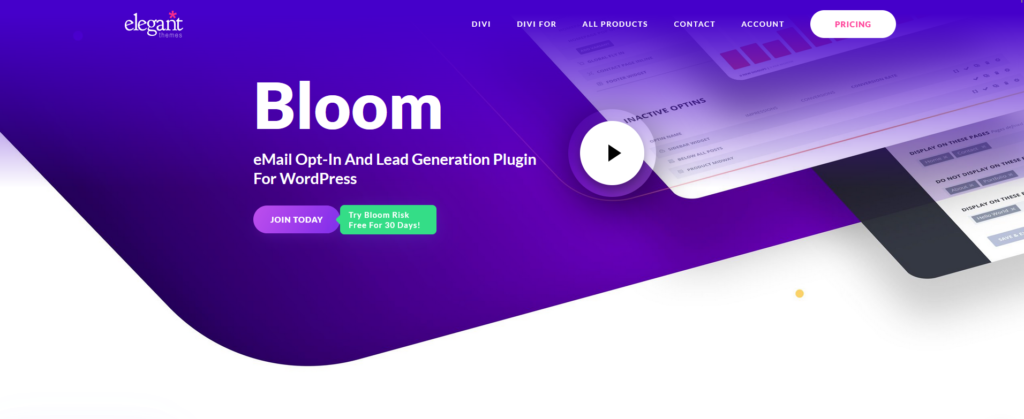
Key Features of Bloom:
- Multiple Opt-In Form Types: Bloom provides six different form display types, including pop-ups, fly-ins, inline forms, below content forms, widget area forms, and content lockers, allowing users to choose the most suitable option for their website’s design and audience.
Extensive Design Options: With over 100 pre-made templates and a wide range of customization settings, users can design visually appealing forms that align with their site’s aesthetics.
Advanced Targeting and Triggers: Bloom offers precise targeting options, enabling forms to be displayed based on specific posts, pages, categories, or user interactions. Triggers such as time delays, scrolling, or after commenting ensure that forms appear at the optimal moment to capture user attention.
A/B Testing: The built-in A/B testing feature allows users to create multiple form variations and test their performance, facilitating data-driven decisions to optimize conversion rates.
Comprehensive Analytics: Bloom provides detailed insights into form performance, including conversion rates and growth over time, helping users understand and enhance their lead generation strategies.
By incorporating Bloom into their websites, users can effectively expand their email subscriber base and enhance their digital marketing initiatives.
Bloom Plugin Features – Powerful Email Opt-In for WordPress
Multiple Opt-In Form Types
Bloom lets you choose from six different opt-in display types, including pop-ups, fly-ins, inline forms, below content forms, widget area forms, and locked content forms. This variety ensures you can capture leads in the most effective way for your audience.
Trigger Options for Better Targeting
With smart triggers like time delay, scroll percentage, after commenting, after purchasing, and after inactivity, you can control exactly when and how your opt-ins appear to users, boosting conversion rates without being intrusive.
Advanced Targeting and Display Settings
Display opt-ins based on post categories, specific pages, or user roles. This allows you to create targeted campaigns that match the content your visitors are engaging with.
Seamless Email Marketing Integration
Bloom integrates with over 20 popular email marketing services, including Mailchimp, ConvertKit, AWeber, and ActiveCampaign. You can connect your opt-ins easily and start growing your subscriber base right away.
Built-In Analytics and A/B Testing
Track impressions, conversions, and effectiveness directly from your WordPress dashboard. Run A/B tests to see which designs and triggers perform best, helping you optimize for better results.
Elegant Design and Customization
Choose from 100+ pre-made templates or create your own. Customize colors, images, fonts, and form fields using an intuitive design editor—no coding required.
Bloom Plugin Pricing
Paid Bloom Plugin Plans
To download the Bloom Plugin, receive regular security updates, and use it to capture leads on unlimited live websites, users must subscribe to an Elegant Themes membership. Bloom is bundled with the Divi ecosystem, so one subscription unlocks all tools.
The Bloom Plugin plans are structured as follows:
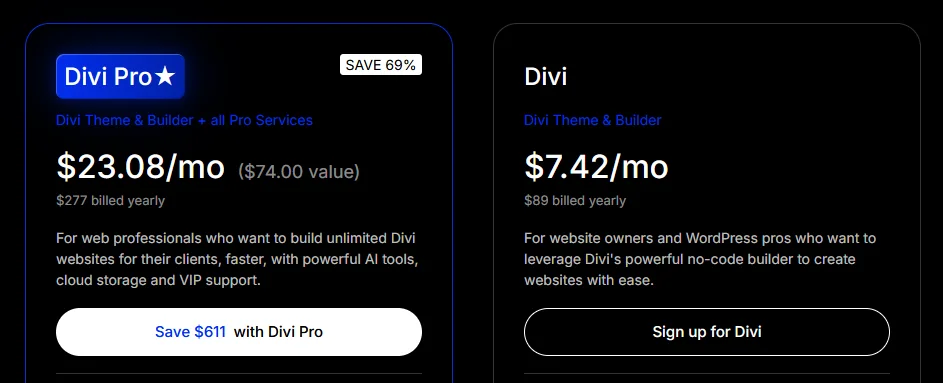
- Divi Plan – $89 billed yearly ($7.42 per month equivalent)
Designed for website owners and WordPress professionals who need a powerful lead generation tool. This plan includes unlimited website usage for Bloom, the Divi Theme, and the Monarch social sharing plugin. It features 24/7 customer support, access to hundreds of website packs, and the ability to use Bloom on an unlimited number of client sites. - Divi Pro ★ – $277 billed yearly ($23.08 per month equivalent)
The best value for agencies and high-growth marketers. This plan includes everything in the standard plan plus premium “Pro Services.” For Bloom users, this provides Unlimited Divi AI usage to help write compelling opt-in copy and headlines. It also includes unlimited cloud storage for saving your custom form designs and Divi VIP support for technical assistance in under 30 minutes. - Lifetime Access – $249 One-Time Payment
Ideal for long-term business owners who want to own their marketing tools forever. This plan provides lifetime updates and support for Bloom, Divi, and Monarch for a single payment. While it does not include recurring Pro services like AI, it is the most cost-effective way to manage email opt-ins across unlimited sites for the long haul.
All plans include a risk-free guarantee, seamless integration with 19 different email marketing platforms, and a comprehensive stats dashboard to track your conversion rates.
30-Day Risk-Free Guarantee
Elegant Themes provides a 30-day money-back guarantee, effectively serving as a trial period for the Bloom Plugin. This allows marketers to experience the full lead-generation suite risk-free. During this window, you can:
- Run A/B Tests: Set up different versions of an opt-in form to see which design converts better.
- Integrate Your Email List: Connect Bloom to your actual provider to see how seamlessly it syncs new subscribers.
- Test Advanced Triggers: Experiment with timed delays or exit-intent pop-ups on a live production site.
Users can sign up, install Bloom on their WordPress site, and if the plugin doesn’t significantly improve their lead generation efforts, they can request a full refund within 30 days. No credit card is required to use the online demo, but a subscription is necessary to download the plugin, making this guarantee the primary way to evaluate Bloom’s ROI.
Bloom Plugin Customer Support and Service
Bloom is backed by Elegant Themes, a company known for its strong customer service and comprehensive support ecosystem. As part of an Elegant Themes membership, users gain access to multiple support channels designed to assist with everything from setup to advanced customization.
24/7 Live Chat Support
All active members, including those on the Yearly and Lifetime plans, have access to 24/7 live chat support directly from their Elegant Themes dashboard. Whether you need help installing Bloom, configuring opt-in forms, or troubleshooting an issue, the support team is ready to provide real-time assistance.
Extensive Documentation and Tutorials
Bloom is supported by an in-depth knowledge base, which includes step-by-step guides, video tutorials, FAQs, and best practices for optimizing opt-in forms. These resources make it easy for both beginners and experienced users to find answers quickly and learn how to maximize the plugin’s features.
Community and Developer Resources
Elegant Themes also maintains an active community forum and a large user base, making it easy to exchange tips and get inspiration from other designers and marketers. For developers, additional documentation is available to help with customizations and advanced integrations.
Pros and Cons of Bloom Plugin
Pros of Bloom Plugin
- Multiple Form Types: Bloom provides six different opt-in form types, including pop-ups, fly-ins, inline forms, below content forms, widget area forms, and content lockers, allowing users to choose the most suitable option for their website's design and user experience.
- Extensive Template Library: With over 100 pre-made templates, Bloom enables users to quickly deploy aesthetically pleasing opt-in forms that can be further customized to match their brand's identity.
- Trigger Options: The plugin offers various trigger settings, such as time delay, scrolling percentage, after commenting, after purchasing, and after inactivity, providing flexibility in how and when opt-in forms are displayed to visitors.
- A/B Testing: Bloom includes built-in A/B testing functionality, allowing users to create multiple form variations and determine which performs best, facilitating data-driven decisions to optimize conversion rates.
Cons of Bloom Plugin
- Lack of Drag-and-Drop Builder: Unlike some competitors, Bloom does not feature a visual drag-and-drop builder, which may limit users seeking more granular control over form design and layout.
- Limited Template Customization: While Bloom offers a substantial number of templates, the customization options are somewhat restricted, potentially hindering users who require highly tailored designs.
- Absence of Exit-Intent Trigger: The plugin does not support exit-intent triggers, a popular feature that displays opt-in forms when a user is about to leave the site, which could be a drawback for some marketers.
- Pricing Structure: Bloom is not available as a standalone product; it comes bundled with the Elegant Themes membership, which includes access to all their themes and plugins. This pricing model may not be cost-effective for users solely interested in the Bloom plugin.
Bloom Plugin Competitors and Alternatives
Bloom is a WordPress email opt-in plugin developed by Elegant Themes, designed to help website owners grow their email lists through pop-ups, fly-ins, inline forms, and locked content. It integrates with many popular email marketing services and is often used by bloggers, marketers, and small businesses already using the Divi ecosystem. However, Bloom has seen limited feature evolution in recent years and lacks some advanced targeting, analytics, and automation capabilities found in newer tools. Depending on your needs—such as advanced behavioral targeting, performance optimization, deeper analytics, or marketing automation—there are several strong competitors and alternatives worth considering.
OptinMonster

OptinMonster is one of the most widely used lead generation and conversion optimization platforms.
Strengths:
Advanced targeting and behavioral triggers (exit intent, page-level targeting);
Drag-and-drop campaign builder with pre-built templates;
Detailed analytics and A/B testing features;
Considerations:
Requires a separate subscription outside WordPress;
Higher pricing compared to basic opt-in plugins;
Convert Pro

Convert Pro is a WordPress-based opt-in plugin focused on performance and advanced targeting.
Strengths:
Lightweight architecture optimized for speed;
Advanced triggers, targeting rules, and A/B testing;
One-time pricing option available;
Considerations:
Smaller template library compared to OptinMonster;
Fewer built-in automation features;
MailOptin

MailOptin is a comprehensive WordPress opt-in and email marketing plugin.
Strengths:
Multiple opt-in form types including pop-ups, slide-ins, and notification bars;
Integrates with major email service providers and CRMs;
Supports email automation and newsletters within WordPress;
Considerations:
Interface can feel complex for beginners;
Advanced features are limited to higher-tier plans;
Thrive Leads

Thrive Leads is part of the Thrive Suite and is designed specifically for conversion-focused WordPress websites.
Strengths:
Advanced targeting, triggers, and A/B testing;
Deep integration with other Thrive conversion tools;
Detailed reporting and performance insights;
Considerations:
Plugin can be resource-heavy on some hosting environments;
Available only through Thrive Suite subscription;
Bloom Plugin Coupon
In conclusion, Bloom by Elegant Themes is a powerful and polished email opt-in solution tailored for WordPress users who prioritize ease of use, aesthetic flexibility, and targeted lead generation. With six form types, detailed display triggers, and seamless integration with top email marketing services, Bloom makes it simple for website owners to build and grow their subscriber lists effectively. The inclusion of built-in A/B testing and analytics ensures that users can fine-tune their strategies to maximize conversions.
However, Bloom’s limitations—such as the absence of a drag-and-drop builder and exit-intent triggers—mean it may not meet the needs of users requiring more advanced design control or behavioral targeting features. Additionally, since it’s only available through an Elegant Themes membership, it may not be the best fit for those seeking a standalone solution. Still, for users already invested in the Elegant Themes ecosystem or looking for an all-in-one design and marketing suite, Bloom delivers strong value, supported by responsive customer service and a wealth of educational resources.
Bloom Plugin Coupon
Looking to grow your email list with beautifully designed opt-in forms? WP Steer readers can get an exclusive 10% discount on the Bloom Email Opt-In Plugin.
Click this link to visit Bloom’s official site—the discount will be applied automatically at checkout. It’s a smart way to boost your conversions while saving on a powerful list-building tool.
Bloom Plugin - Frequently Asked Questions
1. What is the Bloom plugin?
Bloom is a powerful email opt-in plugin developed by Elegant Themes. It helps website owners grow their email lists through customizable opt-in forms like popups, fly-ins, inline forms, widget area forms, and more. Bloom integrates seamlessly with major email marketing platforms and is included with your Elegant Themes membership.
2. Is the Bloom plugin worth it?
Yes! Bloom is an excellent tool for increasing your newsletter or mailing list signups. With its wide range of opt-in types, targeting options, and design customization, it offers features that rival standalone premium plugins—all at no extra cost if you’re already an Elegant Themes member.
3. Who should use the Bloom plugin?
Bloom is ideal for bloggers, marketers, entrepreneurs, and businesses that want to convert website visitors into email subscribers. Whether you’re offering lead magnets, newsletter subscriptions, or promotional content, Bloom provides the tools to optimize your opt-in strategy.
4. What email services does Bloom integrate with?
Bloom supports integration with 19+ popular email marketing platforms, including:
- Mailchimp
- AWeber
- ConvertKit
- Constant Contact
- GetResponse
- ActiveCampaign
- MailerLite
- Campaign Monitor
- And more
5. What types of opt-in forms can you create with Bloom?
Bloom allows you to create various types of opt-in forms, including:
- Automatic Popups
- Fly-ins
- Inline/embedded forms
- Below post forms
- Locked content (require email to access)
- Widget area forms
Each opt-in type can be customized with different triggers, animations, and targeting settings.
6. Does Bloom offer A/B testing?
Yes! Bloom includes built-in A/B split testing, allowing you to test different form designs, headlines, and calls-to-action. This helps you optimize conversion rates by identifying what works best with your audience.
7. Can I target specific posts or pages with Bloom?
Absolutely. Bloom offers advanced targeting options that let you show opt-in forms based on categories, tags, post types, or individual pages. This ensures your forms are always relevant and contextually placed for maximum impact.
8. Is Bloom included in the Elegant Themes membership?
Yes! Bloom is one of the three premium plugins included with your Elegant Themes subscription, alongside Divi Builder and Monarch (social sharing plugin). You don’t need to purchase it separately.
9. Can I use Bloom on multiple websites?
Yes, your Elegant Themes license allows you to use Bloom on unlimited personal and client websites—no restrictions.
10. Is there a money-back guarantee for Bloom?
Bloom comes with Elegant Themes’ standard 30-day money-back guarantee. If you’re not satisfied, you can request a full refund—no questions asked.
11. How do I get updates and support for Bloom?
As long as your Elegant Themes membership is active, you’ll receive regular plugin updates and access to their support team. If you purchase the Lifetime Access plan, you’ll get updates and support forever.
12. Does Bloom slow down your website?
Bloom is optimized for performance, but as with any plugin, it’s important to test its impact on your specific website setup. Most users report smooth performance, especially when forms are used strategically and not overloaded with animations.
13. How much does Bloom cost?
You can’t purchase Bloom individually. It’s included in the Elegant Themes membership, which is priced as follows:
- Yearly Access – $89/year
- Lifetime Access – $249 one-time fee (with lifetime updates and support)