Sloyd AI Review (2026): A Revolutionary AI-Powered 3D Modeling Tool for Creators
In this Sloyd AI review, we explore why this platform has quickly become one of the most exciting tools in the 3D modeling and animation industry. Sloyd AI leverages artificial intelligence to automate the process of creating and customizing 3D assets—making it easier than ever for designers, game developers, and digital artists to produce high-quality 3D models in minutes rather than hours.
Unlike traditional modeling software that often requires years of experience and technical expertise, Sloyd AI focuses on simplicity and speed. Users can generate 3D models instantly using text prompts or adjustable parameters, enabling a seamless blend of creativity and automation. The platform allows for real-time customization through sliders that modify object details such as proportions, structure, and design complexity.
For developers, Sloyd AI integrates smoothly with popular 3D engines and tools like Unreal Engine, Unity, and Blender, making it ideal for game development, animation production, and virtual reality environments. Its AI-driven approach not only accelerates the design process but also ensures that each model is optimized for performance and ready for integration into any digital workflow.
Pros:
- AI-powered 3D model generation and real-time customization
- Intuitive interface suitable for beginners and professionals
- Integration with major tools like Unity, Unreal Engine, and Blender
- Rapid asset creation for games, animation, and AR/VR projects
- Cloud-based workflow with no need for heavy software installations
- High-quality, performance-optimized 3D outputs
Cons:
- Free version offers limited exports and customization options
- Some complex shapes may require manual adjustments post-generation
- Advanced features can have a learning curve for new users
Sloyd AI stands out in 2026 as one of the most promising AI tools for 3D modeling and animation. By merging intuitive design controls with the power of artificial intelligence, it empowers creators to focus more on creativity and storytelling rather than technical details. Sloyd AI delivers a fast, flexible, and intelligent solution for the modern digital creator.
0.0
Used by 10+ million users
Pricing
Planas – $208.33 per month
Planas – $416.66 per month
About Sloyd AI
Sloyd AI is a next-generation tool in the world of Animation AI Tools, designed to make 3D modeling faster, smarter, and more accessible. Built with real-time 3D creators in mind, Sloyd AI uses procedural generation and artificial intelligence to help users instantly create and customize 3D assets for games, animation, and design projects.
Unlike traditional modeling software that demands extensive manual work, Sloyd AI allows creators to generate complex models in seconds through intuitive controls or text-based prompts. The AI automatically handles geometry, topology, and variations, enabling artists and developers to focus on creativity rather than technical details.
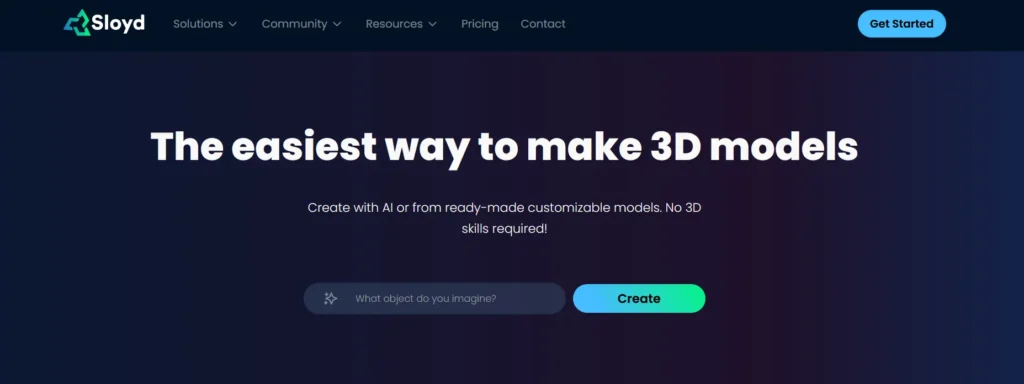
One of the platform’s most impressive features is its web-based editor, which lets users customize and export 3D models directly to popular engines like Unreal or Unity. This makes it an ideal solution for indie developers, animators, and digital artists looking for efficiency without sacrificing quality.
Sloyd AI also emphasizes accessibility. Its browser-based design means there’s no need for heavy installations or advanced hardware—users can start creating immediately from any device. The platform’s smart library and modular approach further simplify asset management, allowing easy reuse and adaptation across projects.
By combining automation with user control, Sloyd AI redefines what’s possible with Animation AI Tools. It bridges the gap between technical modeling and artistic expression, making 3D creation faster, more efficient, and open to everyone—from professional designers to hobbyist creators.
Key Features of Sloyd AI
3D Model Generation
Sloyd AI is an innovative 3D modeling platform that uses artificial intelligence to generate high-quality 3D assets in seconds. Designed for game developers, 3D artists, and digital creators, the platform automates the traditionally time-consuming process of creating 3D objects. With Sloyd AI, users can input parameters or descriptions, and the AI instantly produces optimized, ready-to-use 3D models that can be exported into popular design tools and engines.
Parametric Editing
A standout feature of Sloyd AI is its parametric editing system, which allows users to adjust dimensions, proportions, and design features with intuitive sliders and controls. Instead of manually sculpting or redoing models, creators can fine-tune existing ones to meet exact specifications—making the modeling process faster, more flexible, and efficient.
AI-Assisted Creativity
Sloyd AI empowers creators to focus on design and creativity rather than repetitive technical tasks. Its AI engine suggests design variations and procedural options based on user input, helping users explore multiple styles and shapes effortlessly. This makes it a valuable tool for both professionals and beginners seeking rapid 3D asset generation.
Real-Time Preview and Optimization
The platform features real-time 3D previews, enabling users to view and refine models as they are being created. Sloyd AI also automatically optimizes geometry for performance—ensuring models are lightweight, game-ready, and compatible with engines like Unity and Unreal. This optimization reduces polygon counts without sacrificing visual quality, ideal for interactive applications and VR/AR projects.
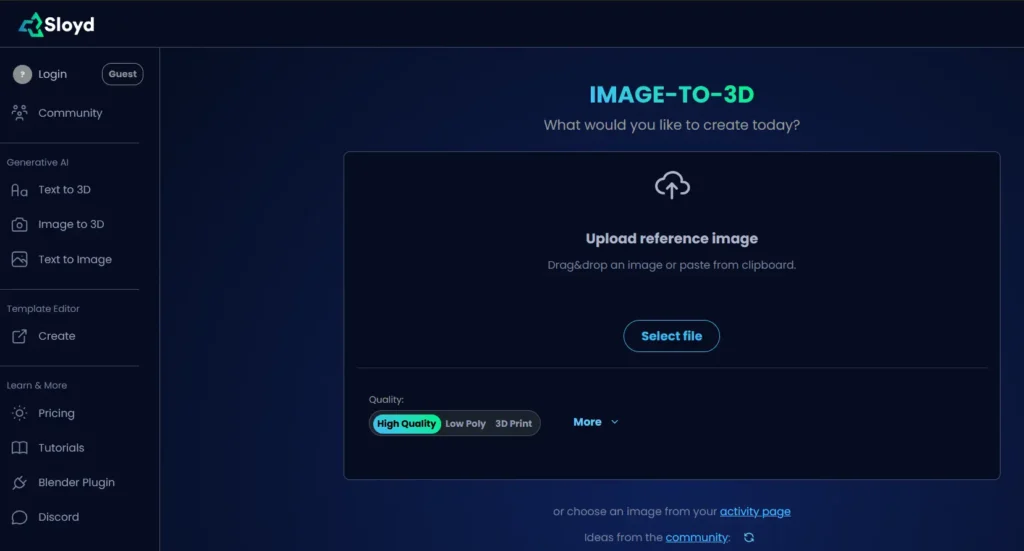
Extensive Asset Library
Sloyd AI provides access to a growing library of pre-built 3D templates and components, including furniture, vehicles, architecture elements, and props. Users can use these assets as starting points or inspiration for new creations. Each model is procedurally generated, meaning it can be easily customized rather than built from scratch.
Seamless Integrations
The platform supports seamless export options to major 3D tools and engines. Users can export files in standard formats such as FBX, OBJ, and GLTF, ensuring compatibility with workflows across Blender, Maya, Unity, Unreal Engine, and other design environments.
Collaboration and Workflow Efficiency
Sloyd AI enhances collaboration among design teams by allowing multiple users to work on models and variations simultaneously. This feature is particularly useful for studios and developers managing large-scale game or animation projects, as it speeds up the prototyping and iteration phases.
Educational and Developer Support
Beyond professionals, Sloyd AI also supports educators and students interested in 3D design. With tutorials, documentation, and a user-friendly interface, the platform helps learners understand procedural modeling concepts while creating assets for projects or portfolios.
Cloud-Based Platform
As a cloud-based tool, Sloyd AI requires no local installation, allowing users to access their projects anytime from any device. This ensures consistent performance and eliminates hardware limitations that often come with traditional 3D modeling software.
Use Cases
Sloyd AI is ideal for a range of industries, including game development, architecture, product visualization, and virtual reality. Its procedural generation capabilities make it perfect for quickly building environments, props, and objects that can be easily customized to fit specific styles or needs.
Sloyd AI represents the future of 3D content creation—merging AI-driven automation with human creativity to dramatically reduce modeling time while maintaining professional quality. Its intuitive controls, real-time editing, and optimization features make it a must-have tool for developers and designers seeking faster, smarter 3D production workflows.
Performance and Quality Review
Speed & Workflow Efficiency
- Fast model generation — According to Sloyd, text-to-3D or image-to-3D model generation typically completes in under 2 minutes per model.
- Real-time customization & parametric editing — Once a base model is generated, Sloyd users can quickly adjust parameters (shape, proportions, detail level, style presets) via sliders and toggles to refine the design. This enables rapid iteration without the slow cycle typical of traditional modeling workflows.
- Browser-based, no installation required — The web editor means users can access Sloyd from any standard device with a browser, lowering barriers and making it especially convenient for hobbyists, indie developers, or teams working remotely.
- Export readiness & integration — Models can be exported in common formats like .glb, .obj, .fbx, or STL, which are compatible with mainstream game engines (e.g. Unity, Unreal Engine), WebGL/AR, 3D printing pipelines, or standard 3D software (e.g. Blender).
- Optimized topology & LOD support — Sloyd aims to produce “game-ready” assets: meshes with clean geometry, adjustable polygon/triangle count, and automatic Level-of-Detail (LOD) generation to support performance on a range of platforms (including mobile/low-end hardware).
Model Quality & Suitability for Animation / Real-Time Use
Mesh Quality, Topology & Exported Assets
Clean geometry & optimized meshes — Sloyd emphasizes clean topology and optimized geometry, producing meshes that are generally lightweight (suitable for games) while retaining enough detail. This is important for performance-sensitive environments (games, AR/VR, mobile).
UV mapping, texture & material controls — With Sloyd 2.0, the platform added a refined material/texture system: click-to-texture material application, a library of curated materials, and style presets. This allows for greater visual coherence and customization of look/feel.
Multiple workflow types: parametric, text-to-3D, image-to-3D — The combination of procedural parametric templates and generative AI-based modeling (text or image) offers flexibility: parametric templates give control and predictable topology; generative modes allow for creative variation.
Game-ready export & engine integration — The ability to export to FBX/GLB/OBJ/STL with proper UVs makes Sloyd outputs directly usable in game engines, AR/VR, WebGL, or 3D printing workflows — reducing friction for developers or creators integrating Sloyd assets.
Limitations & Areas Where Quality Falls Short
Limited scope of supported model types — According to multiple user reviews and Sloyd’s own documentation, Sloyd is currently best suited for props, furniture, weapons, architectural elements, environment assets, low-poly objects, and similar hard-surface models. It does not (yet) support robust generation of characters/organic models (e.g. creatures, humans) in a high-fidelity way.
Texture/material customization remains basic (for some users) — Some reviewers note that the material/texture options can be limited or “rough,” especially for models generated from images: the automatic texturing may produce results that lack detail or polish, and customization options (e.g. advanced shaders, PBR materials) may be more limited than in dedicated 3D tools.
Not a full animation tool — limited by mesh-only output — Because Sloyd focuses on generating static 3D models (meshes/props/assets), it does not inherently support full character rigging, animation cycles, complex skeletal animation, physics-based motion, or cinematic animation pipelines. For any “animation quality,” assets need to be taken into other tools (game engines, animation software) for rigging, skinning, and animation.
Potential variability depending on prompt and model complexity — As with many generative tools, the quality of output from text-to-3D or image-to-3D depends heavily on prompt clarity, complexity of desired model, and subsequent manual polishing. Some users report that highly detailed or very customized models may require extra manual cleanup after export (e.g. smoothing surfaces, fixing mesh issues, adjusting topology) to make them production-ready.
Sloyd AI Pricing Plans
Sloyd AI offers flexible pricing plans designed to accommodate hobbyists, solo developers, and professional studios. While the Free Plan provides essential access, paid tiers unlock unlimited 3D asset creation and commercial use licenses.
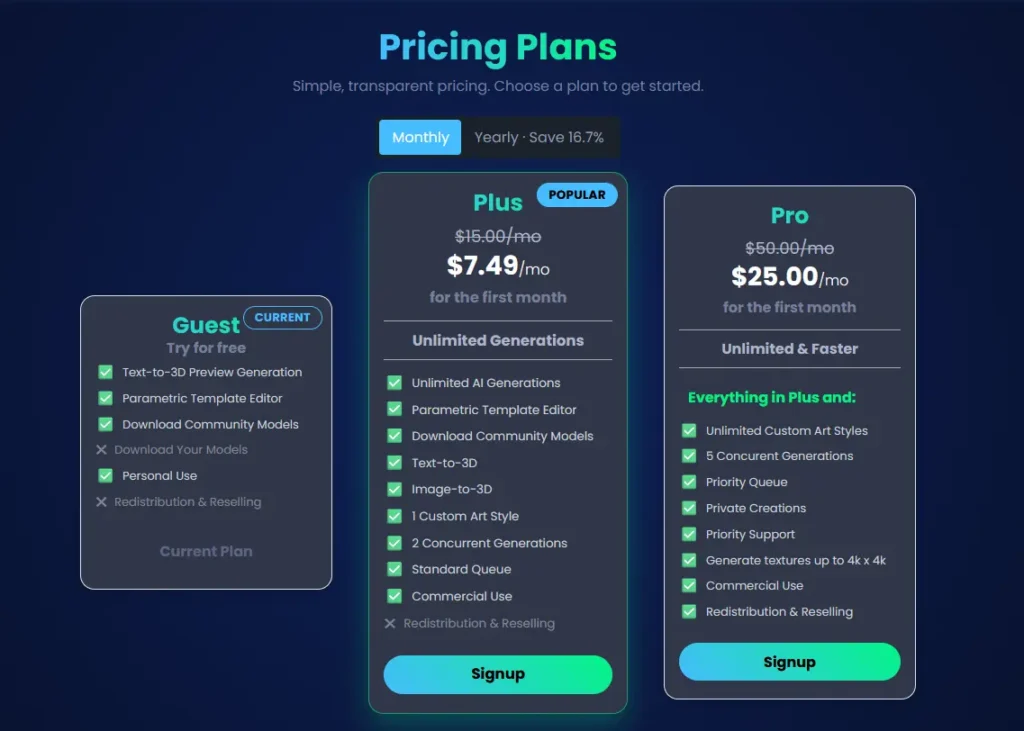
Free Plan
This plan allows full access to the 3D template editor, unlimited image exports, image-to-3D with provided images, and commercial use for video games, web, and applications. Reselling, redistribution on marketplaces, commercial 3D printing, and AI training are not allowed.
- Plus Plan – $11 per month (billed yearly at $132)
Includes all Free Plan features while enabling unlimited 3D exports, unrestricted image-to-3D in beta, and the ability to upload your own textures. Redistributing or reselling on marketplaces remains disallowed. - Pro Plan – $50 per month (contact for quote)
Provides full feature access including text-to-3D, image-to-3D, unlimited custom styles, up to 4K textures, text-to-motion, and commercial license allowing redistribution, reselling, and commercial 3D printing. Includes priority queue and 5 parallel tasks. - Studio & Enterprise Plan Price: Custom quote
For teams and enterprises requiring private generators, SDK/API access, game‐engine plug-ins, priority support, and custom licenses allowing full redistribution and training models.
Sloyd AI’s tiered structure ensures accessibility for beginners while offering scalable capabilities for studios and professionals working on advanced 3D asset production.
Customer Support and Service Quality — Sloyd AI
Support Channels & Accessibility
Sloyd provides customer support via email.
For community support, Sloyd encourages users to join its Discord channel. According to their API pricing page, the Discord is a primary place to ask questions, interact with the team, and discuss workflows.
For enterprise or API-level customers, Sloyd offers “priority support” as part of custom or recurring access plans.
Self-Service & Documentation
Sloyd’s Privacy Policy is clearly documented (as of April 2025), providing transparency about how user data is collected, stored, and processed under GDPR and other regulations.
In their Terms of Use, Sloyd explains support structure: for Plus plan users, the support model is largely self-service (documentation, blog, Discord) and also via email.
Their pricing FAQ explains how to get help for API usage, credit limitations, and subscription issues.
Service Trust & Reliability
- According to Sloyd’s Terms of Use, not all data or projects are guaranteed to be stored permanently. They reserve the right to delete inactive content but aim to notify users beforehand.
- Sloyd operates under Sloyd AS (a Norwegian company) when processing personal data, and acts as its own data controller, adding a level of accountability.
- In case of license or export-related inquiries (e.g., 3D printing or redistribution), Sloyd explicitly asks users to contact support via email, highlighting a willingness to handle specialized use cases.
Data Handling & Privacy in Support Context
- Their data-protection practices are aligned with GDPR, reflecting a professional approach to user data and responsibility in support communications.
- The Terms of Use also explain data retention policies for user-uploaded projects, which affects how support can assist users with stored assets.
Strengths and Potential Limitations
Strengths:
Active community support via Discord enables real-time interaction with both the Sloyd team and other users.
Transparent data privacy and clearly stated support contact points build trust for users, especially for commercial or enterprise workflows.
Proactive customer service as reported by users, particularly on billing and license-related issues.
Support scaled for enterprise: Priority support is available for API customers or users on paid plans, suggesting Sloyd can meet more demanding business needs.
Potential Limitations:
No phone support publicly documented — support is primarily via email and community channels.
Self-service focus for basic users: Plus plan users rely heavily on documentation and Discord support, which may not suit users needing structured onboarding.
Storage risk: As Sloyd does not guarantee indefinite storage of user-generated assets, users may need to manage their own backups or contact support proactively.
Learning curve: Some users indicate that the interface and AI-generation workflow require a period of adaptation, suggesting support for new users could be more guided.
Sloyd AI offers a well-balanced support model that combines self-service documentation, community engagement via Discord, and direct email support. Their responsiveness and proactive customer service are well regarded, especially for technical or billing-related matters. While real-time phone support is not part of their publicly advertised offering, the support infrastructure is sufficiently mature for most users — particularly developers, small teams, and enterprise clients who can benefit from priority support.
Sloyd AI: Pros and Cons
Pros of Sloyd AI
- Fast 3D model generation: Sloyd AI allows users to create 3D assets automatically using procedural generation and AI-powered customization, significantly accelerating the modeling workflow.
- Beginner-friendly interface: Its node-free, slider-based customization tools make 3D creation accessible even to those without prior modeling experience.
- Game-ready assets: The platform produces optimized, low-poly models suitable for real-time engines such as Unity and Unreal, which is valuable for game developers and interactive designers.
- Consistent asset variations: Sloyd can generate multiple variations of a single asset style, helping maintain cohesive visual design across large environments.
- Export flexibility: Models can be exported in common formats like FBX, OBJ, and GLTF, enabling smooth integration into standard 3D pipelines.
Cons of Sloyd AI
- Limited control for advanced modelers: Professionals who need precise topology editing, sculpting, or UV control may find Sloyd restrictive compared to traditional modeling tools.
- Asset category limitations: Although growing, Sloyd’s library focuses mainly on props and environment assets, offering fewer complex models such as characters or advanced organics.
- Requires subscription for full capabilities: High-resolution exports, commercial usage, and advanced customization options are locked behind paid plans.
- Online dependency: As a cloud-based tool, Sloyd requires a steady internet connection and cannot be fully used offline.
Sloyd AI offers a fast and accessible way to generate 3D models, making it an excellent choice for game developers, indie creators, and teams needing quick environment assets. However, its simplified workflow and limited asset categories may pose challenges for advanced artists seeking full creative control or highly specialized models.
Sloyd AI Competitors and Alternatives
As AI continues to reshape the 3D design landscape, Sloyd AI has emerged as a powerful tool for rapidly generating game-ready 3D models using procedural techniques and AI-driven automation. Its ability to create customizable assets—ranging from props to environmental elements—makes it especially valuable for game developers, virtual production teams, and interactive experience creators. However, the 3D and animation AI ecosystem is evolving quickly, and several strong competitors offer alternative approaches, from text-to-3D generation to fully automated asset workflows. Understanding these platforms can help teams choose the best solution for their pipeline, budget, and creative needs.
Luma AI

Luma AI is one of the leading tools in neural 3D generation, enabling users to produce detailed 3D models, scenes, and assets using text prompts or video captures.
Strengths:
High-fidelity text-to-3D and video-to-3D generation;
Supports advanced workflows for VFX, gaming, and virtual production;
Produces realistic textures and complex geometry;
Considerations:
More focused on realism than stylized assets;
Less control over parametric customization compared to procedural tools like Sloyd;
Kaedim
Kaedim converts 2D concept art into usable 3D models using AI-assisted automation, making it a popular tool for game studios needing fast asset turnaround.
Strengths:
Converts sketches and illustrations into 3D meshes very quickly;
Produces game-ready models that integrate well into common engines;
Reduces manual modeling time for artists and studios;
Considerations:
Requires refinement or cleanup for highly detailed assets;
Not designed for procedural customization or bulk parametric generation;
Kinetix

Kinetix focuses on AI-driven 3D animation, allowing users to generate character animations from text or video without requiring motion-capture equipment.
Strengths:
AI-based motion generation and animation creation;
Ideal for animating characters in games, metaverse experiences, and virtual worlds;
User-friendly, with no need for animation expertise;
Considerations:
Focused on animation rather than asset creation;
Not a direct replacement for procedural 3D modeling tools;
Meshy
Meshy provides a full suite of AI-powered 3D generation features, including text-to-3D, image-to-3D, and AI texture creation—making it a versatile competitor to Sloyd AI.
Strengths:
Generates stylized or realistic 3D models from text or images;
Includes AI texture generation and editing tools;
Good for rapid prototyping of characters, props, or concept assets;
Considerations:
Less parametric precision than Sloyd’s procedural modeling system;
Complex or production-grade models may require additional artist work;
Conclusion for Sloyd AI review
As highlighted throughout this Sloyd AI review, the platform represents a major shift in how creators approach 3D modeling, offering unmatched speed, accessibility, and workflow efficiency. By blending procedural generation with AI-driven customization, Sloyd AI empowers both beginners and professionals to produce game-ready assets in minutes—dramatically reducing the time and complexity traditionally associated with 3D design. Its intuitive slider-based controls, real-time previews, and seamless exports to Unity, Unreal Engine, and Blender make it a powerful tool for rapid prototyping, environment building, and asset iteration across games, animation, and interactive media.
While Sloyd AI is not a complete replacement for advanced modeling suites—particularly for complex organic shapes or highly detailed custom meshes—it excels as a fast, intelligent, and flexible solution for modern creators. Its growing asset library, cloud-based editor, and support for both parametric and generative workflows position it as a valuable addition to any digital production pipeline. For developers, artists, and studios seeking to accelerate their 3D workflows without sacrificing quality, Sloyd AI stands out as one of the most forward-thinking tools available in 2026.
Frequently Asked Questions
1. What is Sloyd AI?
Sloyd AI is a browser-based 3D creation platform that uses procedural generation and AI assistance to help users quickly build, customize, and export 3D models. It is designed for game developers, designers, and anyone who needs fast, high-quality 3D assets.
2. How does Sloyd generate 3D models?
Sloyd uses parameter-based procedural modeling. Instead of generating models from scratch each time, assets are built from flexible templates with adjustable parameters such as shape, proportions, style, and detail level. This ensures consistent, predictable results and real-time editing.
3. Do I need 3D modeling experience to use Sloyd?
No. Sloyd is built to be beginner-friendly. Users can create models by adjusting simple sliders and toggles, while more advanced users can fine-tune models with deeper customization controls.
4. What file formats does Sloyd support?
Sloyd typically exports common 3D formats such as GLB, FBX, and OBJ, making the models compatible with popular engines like Unity, Unreal Engine, and most 3D design tools.
5. Can Sloyd AI generate textures?
Yes. Sloyd can generate materials and basic procedural textures. Many assets come with stylized or realistic material presets, and you can edit color, roughness, metallic level, and other surface properties inside the tool.
6. Is Sloyd suitable for game development?
Absolutely. Sloyd is widely used for game development because its models are optimized, lightweight, and engine-ready. They’re typically created with clean topology and low–to-mid poly counts suitable for real-time applications.
7. Can I use Sloyd models commercially?
In most cases, yes—Sloyd allows commercial use of models you create, but licensing depends on the plan you are subscribed to. Always review Sloyd’s current terms to ensure compliance for your specific use case.
8. Does Sloyd support custom uploads?
At the moment, Sloyd focuses primarily on generating models from its procedural templates. Uploading and modifying external meshes is limited, though the platform is continually expanding its capabilities.
9. What kinds of assets can Sloyd generate?
Sloyd offers a growing library of templates including props, environment objects, foliage, buildings, vehicles, tools, furniture, and stylized characters. The selection continues to expand over time.
10. How do AI prompts work in Sloyd?
Sloyd uses prompts to help users find suitable templates or automatically configure model parameters. Rather than generating a mesh solely from text, Sloyd’s prompt-based AI assists in selecting and adjusting procedural templates for high-quality results.
11. Can I customize Sloyd models after generation?
Yes. Each model is fully adjustable. After generating a base asset, you can continue to modify parameters like geometry, scale, style, and materials directly in the editor.
12. Does Sloyd work in real time?
Yes. One of Sloyd’s defining features is its real-time preview and editing. As you adjust parameters, the model updates instantly without long rendering times.
13. Is Sloyd cloud-based or does it require installation?
Sloyd is cloud-based and runs directly in your browser. No installation or local GPU is required.
14. Can I use Sloyd alongside other 3D tools?
Definitely. Sloyd is often used in combination with Blender, Maya, 3ds Max, Unity, Unreal Engine, and other 3D software. Creators frequently export models from Sloyd for further refinement or integration into larger projects.
15. Does Sloyd offer an API or plugin integrations?
Sloyd has been developing integrations for game engines and supports certain plugin workflows depending on the version. API access and integrations continue to evolve, so availability may vary over time.