Divi Builder Review (2026): A Versatile and Feature-Packed WordPress Page Builder
Divi Builder is a powerful WordPress page builder that brings a visual, drag-and-drop editing experience to website creation. Developed by Elegant Themes, Divi Builder is designed for both beginners and professionals, offering a flexible design system with dozens of content modules, global styles, and advanced customization options.
With its real-time editing interface, users can build stunning websites without writing code. Divi Builder also includes built-in A/B testing, reusable layouts, and full WooCommerce compatibility, making it ideal for businesses, bloggers, and online stores. Optimized for SEO, performance, and mobile responsiveness, Divi Builder remains one of the top choices for creating highly customizable WordPress websites.
Pros:
- Intuitive Drag-and-Drop Builder
- Pre-Made Layouts and Templates
- Customizable Design Options
- Global Elements and Styles
- Built-in Split Testing
- Lifetime Pricing Option
Cons:
- Learning Curve
- Performance Issues
- Dependency on Divi
4.9
Ranked 20+ from 263 WordPress Themes
Pricing
About Divi Builder
Divi Builder is a powerful drag-and-drop page builder developed by Elegant Themes, designed to help WordPress users create visually stunning websites without needing to write code. Originally an exclusive feature of the Divi Theme, Divi Builder is now available as a standalone plugin, making it compatible with any WordPress theme.
With an intuitive WYSIWYG (What You See Is What You Get) editor, Divi Builder allows users to design pages in real time using its front-end visual editor or back-end wireframe mode. The builder includes 40+ pre-made modules, such as sliders, forms, galleries, and pricing tables, enabling users to customize layouts effortlessly.
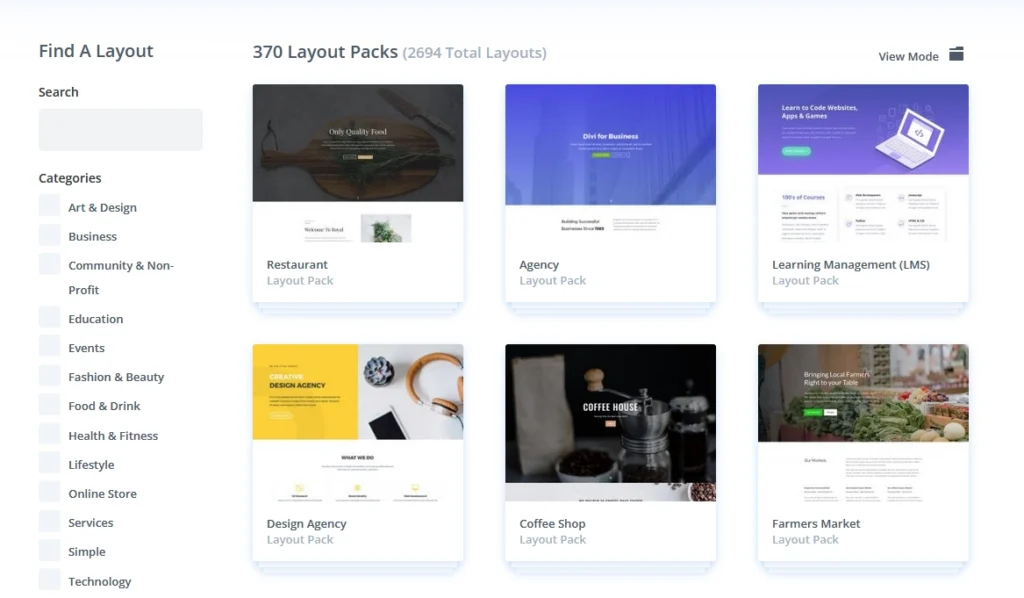
One of Divi Builder’s standout features is its extensive library of pre-designed templates, which streamlines website creation for beginners while offering flexibility for experienced designers. Additionally, advanced options like global elements, custom CSS control, and responsive editing tools ensure seamless customization across all devices.
Divi Builder’s popularity stems from its combination of ease of use, powerful design features, and continuous updates, making it a go-to solution for both freelancers and businesses looking to build professional WordPress websites efficiently.
Divi Builder: Pros and Cons
Pros of Divi Builder
- Intuitive Drag-and-Drop Builder – Divi’s visual editor allows users to design pages effortlessly without coding.
- Pre-Made Layouts and Templates – Access to a vast library of professionally designed layouts saves time and effort.
- Customizable Design Options – Advanced styling controls, animations, and effects make it easy to create a unique website.
- Global Elements & Styles – Users can apply design changes site-wide with Divi’s Global Elements and Theme Builder.
- Built-in Split Testing – Divi includes A/B testing functionality to optimize content performance.
- Lifetime Pricing Option – Unlike many competitors, Divi offers a one-time payment option for lifetime access.
Cons of Divi Builder
- Learning Curve – While beginner-friendly, new users may take time to fully grasp all features.
- Performance Issues – Some sites may experience slower speeds due to Divi’s heavy code base.
- Dependency on Divi – If users switch to another theme, content may require significant reformatting.
Divi Builder Competitors and Alternatives
Divi Builder, developed by Elegant Themes, is a popular visual WordPress page builder known for its drag-and-drop interface, real-time design editing, and extensive module library. It is widely used by freelancers, agencies, and businesses due to its flexible design controls and unlimited website licensing. However, Divi Builder’s shortcode-based framework, performance considerations, and learning curve may not suit every workflow. Depending on your priorities—such as lightweight performance, developer-friendly code, Gutenberg-native editing, or simpler interfaces—there are several strong competitors and alternatives worth considering. Understanding the strengths and limitations of each option can help users select the page builder that best fits their website needs and technical preferences.
Elementor
Elementor is one of the most widely used WordPress page builders and a direct competitor to Divi Builder.
Strengths:
Real-time visual drag-and-drop editor;
Large library of widgets, templates, and third-party add-ons;
Compatible with most WordPress themes;
Considerations:
Advanced features require Elementor Pro;
Complex designs can impact site performance if not optimized;
Beaver Builder
Beaver Builder is known for its stability, clean code output, and focus on long-term maintainability.
Strengths:
Developer-friendly code and strong WordPress compatibility;
Reliable performance and minimal conflicts with themes and plugins;
Popular among agencies and client-focused projects;
Considerations:
Fewer built-in design elements compared to Divi Builder;
Premium pricing relative to feature depth;

Strengths:
Clean and intuitive interface with inline editing;
Quick setup using pre-designed blocks and templates;
Available as both a WordPress plugin and cloud-based platform;
Considerations:
Smaller ecosystem compared to Elementor or Divi;
Limited advanced customization options;
Divi Builder - Frequently Asked Questions
1. Can Divi Builder be used without the Divi theme?
Yes. Divi Builder is available as a standalone plugin and can be used with most WordPress themes. This allows users to keep their existing theme while adding Divi’s visual page-building capabilities.
2. Does Divi Builder support full-site editing?
Divi Builder supports Theme Builder functionality, which allows users to visually design headers, footers, blog templates, and custom post layouts. While it is not based on WordPress’s native Full Site Editing (FSE), it provides similar site-wide control through its own system.
3. How does Divi Builder handle responsive layouts?
Divi Builder includes device-specific controls, allowing users to adjust spacing, font sizes, visibility, and layout settings separately for desktop, tablet, and mobile views.
4. Can Divi Builder be used with Gutenberg blocks?
Yes. Divi Builder and Gutenberg can coexist on the same site. Users can choose which editor to use on each page, though mixing both builders within the same page is generally not recommended.
5. Does Divi Builder allow custom CSS and advanced styling?
Yes. Divi Builder allows:
- Custom CSS per module, row, or section
- Global CSS via the theme options
- Hover states and advanced design controls
This makes it suitable for both designers and developers.
6. Is Divi Builder suitable for large or complex websites?
Yes, but with considerations. Divi Builder can power large websites, including blogs, business sites, and online stores. Performance depends heavily on hosting quality, caching, and asset optimization, as Divi generates more markup than block-based editors.
7. Does Divi Builder include role-based access control?
Yes. Divi includes a Role Editor, allowing administrators to control what different user roles can edit inside the builder—useful for teams, clients, and agencies.
8. Can Divi Builder create dynamic content layouts?
Yes. Divi supports dynamic content, enabling users to pull data from WordPress fields such as post titles, featured images, custom fields (ACF compatible), and author data into layouts automatically.
9. How does Divi Builder handle global styles?
Divi Builder includes Global Elements and Presets, allowing users to reuse design elements across multiple pages. Changes to global items automatically update everywhere they are used.
10. Is Divi Builder compatible with WooCommerce?
Yes. Divi Builder includes WooCommerce modules that allow users to design product pages, shop layouts, and custom templates visually without writing code.
11. Does Divi Builder support third-party plugins?
Yes. Divi Builder works with most WordPress plugins, including SEO, security, caching, and marketing tools. However, some plugins that inject heavy scripts may impact performance.
12. Can layouts be exported or reused across websites?
Yes. Divi Builder allows users to export layouts, sections, and full page designs as JSON files, making it easy to reuse designs across multiple websites.
13. What are the main limitations of Divi Builder?
Some commonly noted limitations include:
- More complex HTML output than block editors
- Learning curve for advanced features
- Dependence on shortcodes (lock-in effect if switching builders)
These trade-offs come with Divi’s high level of design flexibility.