CopyCoder AI Review (2025): A Cutting-Edge AI for Coding Prompt Generator
In this CopyCoder AI review, we explore how this platform is redefining productivity for developers and designers through intelligent ai for coding workflows. CopyCoder AI allows users to upload UI screenshots or design mock-ups and then generates optimized prompts for AI coding assistants—enabling faster, more accurate front-end code generation.
For developers looking to bridge design and implementation, CopyCoder AI supports frameworks like Cursor, Bolt, and v0, and exports responsive HTML/CSS from visual inputs. This makes it a valuable addition to your development stack—especially when rapid prototyping or design-to-code translation is required.
Pros:
- AI-Powered Code Generation
- User-Friendly Interface
- Time Efficiency
- Multi-Language Support
- Learning Aid
Cons:
- Limited Free Access
- Occasional Inaccuracies
- No Collaboration Tools
- Internet Dependency
CopyCoder AI stands out as a highly efficient AI for coding tool, ideal for developers who want to accelerate UI development and design-driven code generation.
4.1
Average from 93 verified reviews
Pricing
Starter plan – $15 per month
Pro plan – $39 per month
Team plan – $49 per month
About CopyCoder AI
CopyCoder AI is a promising AI-powered development tool. Developers and product designers increasingly recommend it for its ability to convert visual UI designs into structured prompts for code generation. The platform was founded by a team of engineers passionate about bridging the gap between design and development. It is gaining traction as a fast and intuitive way to kickstart app creation.
More than just a tool, CopyCoder AI is built around a growing community of developers, indie makers, and AI enthusiasts. Its mission is to help users move from concept to code with minimal friction by transforming screenshots, mockups, and wireframes into optimized prompts for AI coding assistants like Cursor, v0, and Bolt.

Initially, CopyCoder focused on basic image-to-code translation. Today, it offers a streamlined interface where users can upload UI designs and receive structured prompts tailored to their preferred development tools. These prompts are designed to generate clean, functional code with the appropriate libraries, configurations, and UI components already scaffolded—saving hours of manual setup.
One of the reasons CopyCoder AI continues to stand out in the fast-evolving AI development space is its simplicity and flexibility. The platform is web-based, supports a wide range of input formats, and is designed to be accessible to both solo developers and teams. While pricing details are not publicly listed, CopyCoder offers a free trial and encourages users to reach out for custom plans.
Plus, there are no long-term commitments. If you’re not satisfied with the results, you can stop using the service at any time—no questions asked.
Key Features of CopyCoder AI
AI-Powered Code Generation
CopyCoder AI is an advanced AI coding assistant designed to accelerate front-end development through intelligent code generation. It helps developers and designers quickly transform ideas, text prompts, or UI mockups into clean, functional code. Built with a focus on efficiency and accuracy, CopyCoder AI supports multiple programming languages, including HTML, CSS, JavaScript, and React, making it a valuable tool for modern web development.
Front-End and UI Development Focus
Unlike many coding AIs that prioritize backend logic, CopyCoder AI stands out for its strong emphasis on front-end and design-driven code generation. Users can create responsive layouts, styled components, and interactive elements with minimal effort. This makes it particularly appealing for designers who want to produce production-ready code without deep programming expertise.
Code Optimization and Refactoring
CopyCoder AI doesn’t just write code—it improves it. The platform can optimize existing codebases by removing redundancies, improving readability, and following best practices. Its AI-driven refactoring suggestions help maintain clean architecture, which is especially useful for teams managing large or complex projects.
Integration with Design Tools
CopyCoder AI integrates seamlessly with popular design software and developer environments, bridging the gap between design and deployment. Designers can export assets directly into code, while developers can modify or extend them in their preferred IDEs. This smooth workflow reduces communication barriers between design and engineering teams.
Customization and Flexibility
The platform allows users to control various aspects of code generation, from framework preferences to styling conventions. Developers can fine-tune how the AI writes components, ensuring the output aligns with their project’s architecture and coding standards.
Collaboration and Version Control
CopyCoder AI supports team collaboration by integrating with version control systems like GitHub and GitLab. This makes it easy for teams to review, merge, and manage AI-generated code, ensuring transparency and consistency across development workflows.
Learning and Adaptation
The more you use CopyCoder AI, the smarter it becomes. The system learns from user prompts, preferred syntax, and project context, adapting over time to generate more accurate and personalized code snippets.
Pricing and Accessibility
CopyCoder AI offers a free plan with limited prompt usage, suitable for testing and small projects. Paid tiers unlock extended features, API access, and collaboration tools for professional teams and agencies.
CopyCoder AI continues to redefine how developers approach front-end development. It combines the precision of AI-driven code generation with the creativity of human design. The tool is essential for anyone looking to speed up UI creation. It also helps streamline workflows. At the same time, it maintains high-quality code in modern web projects.
Performance and Code Quality
Performance
Performance here can be understood in terms of several aspects: speed, efficiency, productivity gains, and how well it integrates into a development workflow.
Speed & Time Efficiency
According to its own site, CopyCoder claims it can reduce development time by up to 80%.
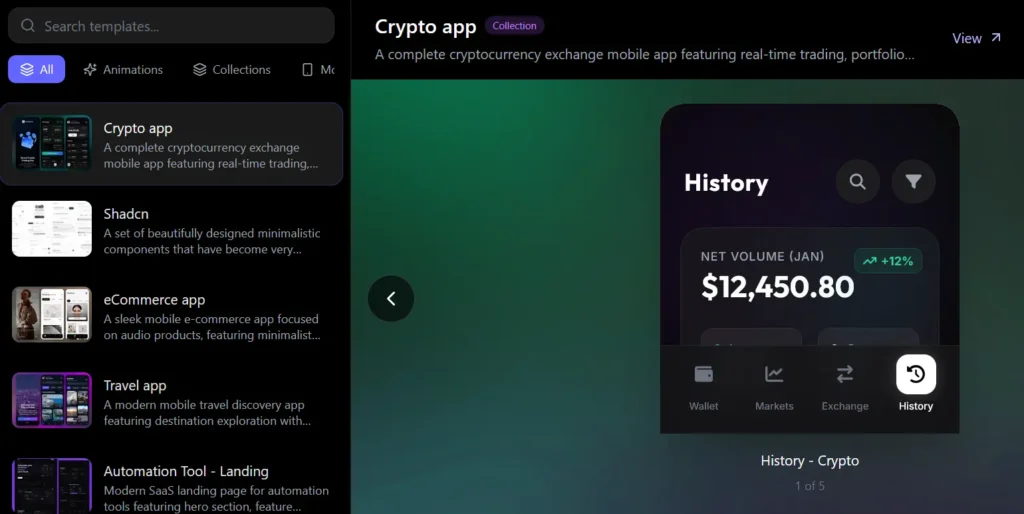
The process is quite streamlined: you upload a visual design (PNG, JPEG, screenshot, or even Figma link), the tool analyzes it, and then you receive a prompt optimized for your chosen AI coding assistant.
In practice, this means what might normally take hours of hand-crafting prompts (or manual coding) can be compressed into minutes with CopyCoder’s automated design interpretation.
Usability & Integration
CopyCoder supports popular AI coding assistants (Cursor, Bolt, v0) by producing prompts that are directly usable in those systems.
It offers a visual “Builder” mode, where you can plan and mock up web apps, landing pages, or component layouts—making it accessible for developers and non-designers alike.
The tool is designed to export to responsive HTML/CSS, or to prompts for your AI agent, which gives flexibility depending on how much manual involvement or automation you want.
CopyCoder (Komposo) also supports multi-image upload, which is particularly useful for cloning entire applications or multi-screen flows.
Reliability & Maturity
As a commercial SaaS, CopyCoder is backed by a substantial user base. According to its site, it is “trusted by 100,000+ users,” which suggests stability and active development.
They have a clear data retention and privacy policy. Your designs and code remain private. They do not use your specific project code or images for training without explicit consent.
There is an active community on Discord, GitHub, and social channels. This community provides support, feedback, and opportunities for shared learning.
Code Quality
Though CopyCoder doesn’t write code directly, it helps produce high-quality code through AI coding assistants. The quality of that code depends heavily on the prompts. It also depends on how the downstream AI model interprets them. Here are some considerations around that:
Prompt Quality
- One of CopyCoder’s strongest features is its ability to analyze visual design elements (layout, spacing, hierarchy, design components) and convert them into well-structured prompts that reflect the design’s intent.
- These prompts are “optimized” for specific AI coding tools, which means CopyCoder tries to account for how a given assistant (Cursor, Bolt, etc.) interprets instructions.
- Better prompts usually lead to better code generation: clarity in UI components, specifications around responsiveness, and properly explained interactions help the AI write more maintainable and accurate code.
Framework Support
CopyCoder supports exporting for common front-end frameworks: as per their site, it supports React, Vue, Angular (depending on plan and usage).
This means that the generated prompts can be used to produce code that aligns with established front-end development patterns and folder/component structures, which supports maintainability.
Maintainability & Best Practices
According to CopyCoder’s own claims, the tool helps generate “clean, maintainable code that follows best practices and industry standards.”
Because CopyCoder generates prompts rather than code, it’s not prescribing a fixed code structure but rather giving good guidance to the AI assistant. As a result, the maintainability of the final code depends both on the prompt quality and on the underlying AI model’s capability.
Limitations & Risks
- Since the actual code is generated by a downstream AI, there’s always a layer of uncertainty: AI-generated code may need refinement, review, and sometimes bug fixes.
- In real-world use, developers report that AI-generated code sometimes introduces code smells, or requires manual cleanup.
- There’s a broader challenge in AI code generation: many studies and community experiences suggest that AI tools (in general) may not produce highly optimized or performance-efficient code without careful prompting or human oversight.
- Finally, because CopyCoder relies on interpreting design images, ambiguities in design (e.g., unclear components, minimalistic mockups) might lead to less precise prompts, which in turn could generate suboptimal code.
Security & Privacy
CopyCoder’s privacy policy states that user content (code/designs) is private and not used for training without explicit consent.
That said, generated code, depending on how it’s used, still needs the usual security review — just like any code: AI doesn’t inherently guarantee secure-by-default architecture.
CopyCoder AI Pricing Plans
CopyCoder AI offers tiered pricing plans designed to accommodate individual developers, designers, and teams working on AI-powered UI design and front-end code generation.
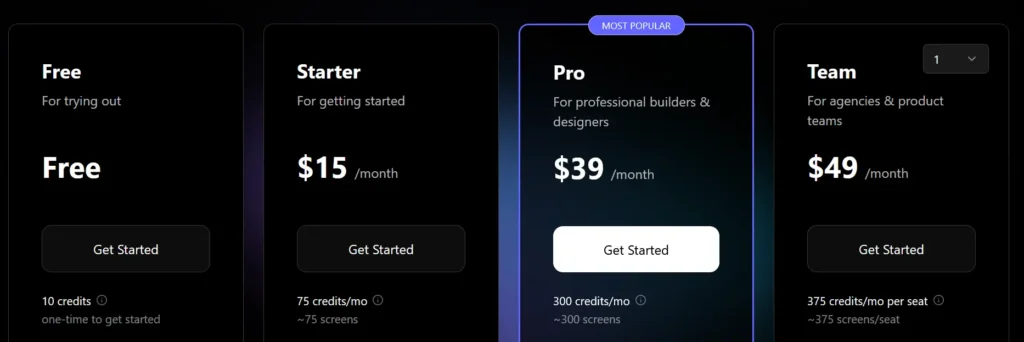
- Free Plan – Free
Designed for trying things out, the Free Plan offers 10 one-time credits to get started. It includes one project and standard customer support, making it a simple way to explore the core features before upgrading. - Starter Plan – $15 per month
Ideal for getting started, the Starter Plan provides 75 monthly credits (around 75 screens) and one active project. It supports exports to Figma and code, the option to purchase additional credits, and standard customer support—perfect for individuals exploring the platform or working on smaller projects. - Pro Plan – $39 per month
Built for professional builders and designers, the Pro Plan includes 300 credits per month, which covers about 300 screens. It also offers unlimited projects and custom themes. You can share projects and export designs to Figma and code. Additional credits can be purchased as needed. The plan also provides priority customer support for a smoother, faster workflow. - Team Plan – $49 per month
Designed for agencies and product teams, the Team Plan provides 375 credits per seat each month , along with everything included in the Pro plan. It adds shared projects, custom branding, centralized billing, and commercial use rights, plus dedicated 1-on-1 onboarding and support to help teams collaborate efficiently and scale with confidence.
These pricing options give users flexibility whether they’re starting out with AI-powered UI generation or scaling up to professional-grade workflows.
Customer Support and Service Quality — CopyCoder AI
Support Channels & Accessibility
CopyCoder provides support via email
For community-based support, CopyCoder has a large Discord server (12,000+ members) where users can ask questions, share projects, and receive peer assistance.
The company maintains an active online community, including on Discord and Twitter, which helps users get help, report bugs, and engage with other developers.
Support Level by Plan
According to their pricing page, CopyCoder distinguishes support tiers:
- Starter Plan: “Standard customer support”
- Pro Plan: Includes “Priority customer support” for higher-tier subscribers.
This tiered model ensures users who pay more can get faster or more dedicated support.
Self-Service Resources
CopyCoder’s website provides video tutorials, helping users learn features, workflows, and how to integrate with AI coding assistants.
The FAQ section on the site answers common user questions about framework support, design formats, cancellation, and billing.
Their Terms of Service page also provides clarity on cancellation, refunds, and billing processes, which helps reduce support requests for these topics.
Service Reliability & Trust
According to ScamMinder, the CopyCoder.ai site has a 100/100 trust score, suggesting strong legitimacy and reliability.
On the other hand, the site’s trust profile on ScamAdviser reveals some anonymity in domain registration, which may raise concerns for more risk-sensitive users.
The Terms of Service indicate that they aim for high service availability but do not guarantee uninterrupted access, meaning occasional downtime or service disruption is possible.
Strengths and Risks in Support Quality
Strengths:
Community Support: The large Discord community is a strong asset, giving users access to peer advice and real-world use case discussion.
Tiered Support: Priority support for Pro users ensures that higher-paying customers receive faster help when needed.
Good Self-Help Resources: Video tutorials and FAQs help users troubleshoot without submitting support tickets.
Transparent Billing/Refund Policy: Clear cancellation and refund rules in the Terms of Service help set user expectations and reduce billing disputes.
Risks / Challenges:
Limited Formal Support Channels: Email is the primary official support method; there is no publicly documented phone or live chat support.
Trust Ambiguity: Mixed signals from domain registration transparency (per ScamAdviser) could concern some users.
No SLA Commitment: The Terms do not promise guaranteed uptime or response times, so enterprise users may find risk in mission-critical applications.
Community Dependence: Relying heavily on Discord for community support means resolution quality depends on peers, not always on expert or official support staff.
CopyCoder AI’s customer support and service quality are solid for a modern SaaS startup. Its active Discord community and helpful self-service resources add value. The tiered support model gives priority to paid users. Transparent billing terms are another plus. However, there is no guaranteed uptime or phone-based support. Moderate trust signals around domain ownership may also limit appeal. This could be a concern for highly risk-sensitive or enterprise customers.
CopyCoder AI: Pros and Cons
Pros of CopyCoder AI
- AI-Powered Code Generation: CopyCoder AI helps developers and non-technical users write, debug, and optimize code across multiple programming languages using natural language prompts.
- User-Friendly Interface: The tool’s clean and intuitive design allows users to generate and edit code snippets quickly, even with minimal technical expertise.
- Time Efficiency: By automating repetitive coding tasks, CopyCoder significantly speeds up development and reduces manual workload.
- Multi-Language Support: Supports a wide range of programming languages, making it suitable for web development, data analysis, and software engineering projects.
- Learning Aid: Ideal for beginners who want to understand coding logic, as it explains and comments on generated code snippets.
Cons of CopyCoder AI
- Limited Free Access: The free version provides restricted usage, requiring an upgrade to access full coding capabilities or longer scripts.
- Occasional Inaccuracies: Generated code may need manual review or debugging to ensure accuracy and best practices.
- No Collaboration Tools: Currently lacks built-in team or real-time collaboration features, which may limit use in larger development environments.
- Internet Dependency: Requires an active connection to process and generate code, as all AI computation is cloud-based.
CopyCoder AI offers a powerful, time-saving solution for developers and learners. It transforms natural language into clean, usable code. While it boosts productivity and learning, users should be aware of some limitations. Free usage is restricted, inaccuracies can occur, and collaborative features are lacking.
CopyCoder AI Competitors and Alternatives
CopyCoder AI is a writing and code-generation tool. It helps users create marketing copy, improve content quality, and automate routine writing and coding tasks. The tool combines AI-assisted text generation with developer-friendly features. This makes it useful for marketers, copywriters, and programmers alike. However, your choice depends on priorities. If you need stronger marketing capabilities, more advanced coding assistance, or broader AI workflows, other alternatives may be a better fit. Leading AI models like ChatGPT and specialized tools such as Jasper or GitHub Copilot are worth comparing. Evaluating their strengths and limitations can help you pick the most effective platform for your needs.
Jasper AI
Jasper AI is a prominent AI writing platform built specifically for marketing teams, offering templates and workflows optimized for ads, blogs, email campaigns, and brand-aligned content.
Strengths:
Robust marketing templates and frameworks;
Strong brand voice customization and style consistency;
Collaborative tools suited for content teams;
Considerations:
Focused primarily on marketing content, making it less versatile for deep coding tasks;
Higher pricing may not suit casual or occasional users;
ChatGPT

ChatGPT is a versatile AI assistant capable of generating marketing copy, technical explanations, code, and creative content across a wide range of formats.
Strengths:
Highly flexible—supports writing, coding, editing, brainstorming, and analysis;
Strong coding capabilities, including debugging and refactoring;
Large model ecosystem with continuous improvements;
Considerations:
Requires human oversight to ensure factual accuracy;
Not specialized solely in marketing workflows or long-form content pipelines;
GitHub Copilot

GitHub Copilot is a leading AI coding assistant designed for developers who want in-IDE support for writing, analyzing, and improving code.
Strengths:
Deep integration with development environments;
Excellent at autocompleting code, generating functions, and identifying errors;
Ideal for software engineers needing productivity boosts;
Considerations:
Focused exclusively on coding—offers little value for marketing or general content creation;
Requires knowledge of programming to use effectively;
Writesonic
Writesonic is an AI writing suite built for marketers, entrepreneurs, and content creators, offering tools for SEO-optimized blogs, ads, product copy, and editing.
Strengths:
Strong long-form content generation and SEO tools;
Includes complementary tools like AI image generation and chatbots;
Flexible pricing for individual users and teams;
Considerations:
Some outputs may require more editing for tone and accuracy;
Less focused on coding support compared to CopyCoder AI;
Conclusion for CopyCoder AI review
In summary, CopyCoder AI delivers a powerful blend of design-to-code automation, prompt optimization, and workflow acceleration that makes it an invaluable tool for modern front-end development. Its ability to translate visual layouts into structured prompts significantly reduces manual setup time, enabling creators to move from concept to code with exceptional speed. For developers, designers, and teams seeking a more efficient way to build interfaces, the platform offers a practical solution that bridges the long-standing gap between design and implementation.
While it isn’t without limitations—such as reliance on downstream AI for final code quality and the need for occasional manual refinement—CopyCoder AI’s strengths outweigh its drawbacks. Its expanding ecosystem, active community, and intuitive UI position it as a forward-looking tool in the rapidly evolving AI development landscape. As covered throughout this CopyCoder AI Review, the platform stands out as a reliable, flexible, and productivity-focused companion for anyone aiming to streamline their front-end workflow and enhance the quality of AI-assisted code generation.
CopyCoder AI Coupon – Save Up to 20% on AI Coding Tools
Looking to lower the cost of your AI-powered design-to-code workflow? CopyCoder AI offers built-in savings of up to 20% through special promotions and subscription deals available directly on its website, with no coupon code required.
To take advantage of these offers, simply click through to CopyCoder AI’s official website. Any active discounts will be automatically applied during signup or checkout. It’s a great way to turn designs into clean, exportable code while spending less on your AI development tools.
CopyCoder AI – Frequently Asked Questions
1. What is CopyCoder AI?
CopyCoder AI is an AI-powered writing and coding assistance tool designed to help users generate marketing copy, technical content, documentation, and code snippets. It uses large language models to improve productivity and streamline content creation.
2. What can CopyCoder AI be used for?
Users commonly rely on CopyCoder AI for drafting blog posts, marketing text, product descriptions, email campaigns, technical documentation, basic code templates, and idea generation. It can also help with rewriting, summarizing, and editing text.
3. Does CopyCoder AI write code?
Yes. CopyCoder AI can generate example code snippets, explain programming concepts, and help with debugging suggestions. However, users should always review and test the code, as AI-generated code may need adjustments.
4. Is CopyCoder AI suitable for professional writing?
Yes. CopyCoder AI can produce high-quality, structured content for blogs, product pages, scripts, and internal company documents. Human editing is still recommended to ensure accuracy, brand consistency, and compliance with organizational standards.
5. Can I use CopyCoder AI for commercial projects?
Yes. Most plans typically allow commercial usage of AI-generated text and code. Users should review the platform’s licensing terms to confirm rights for specific use cases such as published content, marketing materials, or client work.
6. Does CopyCoder AI support multiple languages?
CopyCoder AI generally supports content generation in many major languages. Quality varies depending on the language, so users should proofread multilingual outputs to ensure fluency and accuracy.
7. Can CopyCoder AI generate long-form content?
Yes. It can assist with articles, reports, guides, and scripts. Longer projects often benefit from user guidance, structure outlines, and manual refinement to maintain coherence.
8. How accurate is the code generated by CopyCoder AI?
While the tool can generate useful templates, examples, and explanations, the output isn’t guaranteed to be production-ready. Users should validate logic, test security considerations, and adapt code to their environment.
9. Does CopyCoder AI integrate with other tools?
CopyCoder AI commonly offers features such as browser access or integrations with editors like VS Code, Google Docs, or CMS platforms. Integration options depend on the specific plan or version available.
10. Is my data secure with CopyCoder AI?
CopyCoder AI typically uses standard encryption practices to protect user data. However, users should avoid entering highly sensitive information, proprietary code, or confidential business details, as with any cloud-based system.
11. Can CopyCoder AI help improve existing content?
Yes. It can rewrite, optimize, expand, shorten, or adjust tone for existing content. It can also provide suggestions for clarity, SEO improvements, and readability enhancements.
12. Does CopyCoder AI support SEO writing?
Yes. It can generate keyword-rich headlines, meta descriptions, outlines, and optimized paragraphs. Users should still verify accuracy and follow best SEO practices.
13. Is there a free version of CopyCoder AI?
CopyCoder AI typically offers a free trial or limited access tier for testing basic features. Advanced capabilities—such as higher usage limits, premium models, and priority generation—are usually included in paid plans.
14. Who is CopyCoder AI best suited for?
CopyCoder AI is useful for marketers, copywriters, developers, content creators, small businesses, agencies, and teams needing scalable writing and coding support.
15. Do I still need to edit the output from CopyCoder AI?
Yes. While CopyCoder AI can generate high-quality drafts, human review ensures accuracy, context alignment, brand voice consistency, and compliance with project or legal requirements.