Brizy Review (2025): A Modern and Intuitive WordPress Page Builder
Brizy is a next-generation WordPress page builder designed for effortless website creation. With its clean interface, drag-and-drop functionality, and pre-made design blocks, Brizy is perfect for users who want a streamlined site-building experience without complex settings or coding.
Unlike traditional page builders, Brizy offers a real-time editing experience, where users can modify text, images, and layouts directly on the page. The platform is SEO-friendly, lightweight, and mobile-responsive, ensuring fast performance and an excellent user experience. Brizy also supports global styling, dynamic content, and integrations with popular marketing tools, making it a great choice for bloggers, business owners, and designers alike.
Pros:
- User-Friendly Interface
- Real-Time Editing
- Pre-Designed Templates
- Cloud-Based Version
- Affordable Pricing
Cons:
- Limited Third-Party Integrations
- Fewer Advanced Features
- Newer in the Market
4.2
Average from 169 verified reviews
Pricing
Agency: $69 per month
Agency: $69 per month
White Label: $159 per month
About Brizy
Brizy is a modern drag-and-drop WordPress page builder designed for users who want an intuitive, code-free website design experience. Developed by ThemeFuse, Brizy focuses on ease of use with its highly visual editing interface, allowing both beginners and experienced developers to create stunning web pages effortlessly.
Unlike traditional page builders, Brizy uses a clutter-free design approach, keeping the interface simple and distraction-free. With a real-time WYSIWYG (What You See Is What You Get) editor, users can edit text, images, and layouts directly on the page without navigating complex settings. Additionally, Brizy provides a vast library of pre-designed blocks, templates, and global styling options, making customization quick and seamless.
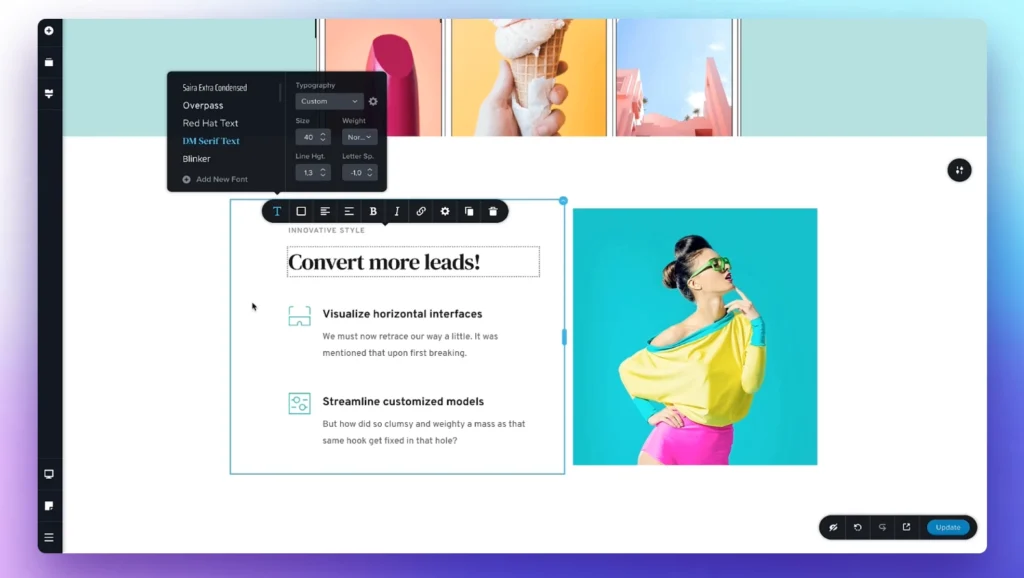
Brizy comes in both free and Pro versions, with the premium edition offering advanced features such as dynamic content, pop-up builders, and third-party integrations for marketing and automation. The tool is also available as a cloud-based website builder, allowing users to design and host websites independently of WordPress.
With its combination of user-friendly design, powerful features, and affordability, Brizy continues to gain popularity as a go-to solution for freelancers, agencies, and businesses looking for a flexible and efficient way to build WordPress websites.
Brizy Pricing
Brizy offers flexible pricing plans tailored to different website-building needs, from solo creators to large agencies managing multiple clients. The entry-level Personal plan is designed for users who want an easy, AI-powered way to build and manage a single website with reliable hosting and team collaboration features included.

Here’s a breakdown of Brizy’s pricing and what’s included in each plan, following the exact structure of your example and using only the information from the official page:
Personal: $19 per month, this plan is best for building a single website. It includes the AI Builder, 1 website with the option to add more for $17/month per site, premium hosting on AWS, 1 workspace, and unlimited team members.
Agency: $69 per month, this plan is designed for growing companies that need to manage multiple sites. It includes the AI Builder, 10 websites with additional sites at $12/month each, premium hosting on AWS, 10 workspaces, unlimited team members, and priority email support.
White Label: $159 per month, this plan is built for larger companies managing clients under their own brand. It includes a white-label AI Builder, 10 websites with additional sites at $8/month each, premium hosting on AWS, 10 workspaces, unlimited team members, priority email support, client management features, and a fully white-labeled platform.
Brizy: Pros and Cons
Pros of Brizy
- User-Friendly Interface – Brizy’s clean and intuitive drag-and-drop builder makes website creation effortless.
- Real-Time Editing – Users can edit elements directly on the page with a true WYSIWYG (What You See Is What You Get) experience.
- Pre-Designed Templates – A wide range of templates and design blocks simplify the web design process.
- Cloud-Based Version – Brizy Cloud allows users to build and host websites without needing a separate hosting provider.
- Affordable Pricing – Brizy offers competitive pricing, including a free version with basic features.
Cons of Brizy
- Limited Third-Party Integrations – Compared to other page builders, Brizy supports fewer integrations with external tools.
- Fewer Advanced Features – Some professional-level features, like extensive theme-building capabilities, are more limited than competitors.
- Newer in the Market – Brizy is relatively new compared to established builders, meaning fewer resources and community support.
Brizy Competitors and Alternatives
Brizy is a modern WordPress page builder focused on simplicity, offering a clean interface, inline editing, and pre-designed blocks for fast website creation. While it appeals strongly to beginners and non-technical users, the WordPress page builder ecosystem is highly competitive. Depending on your needs—such as advanced design control, performance optimization, or extensibility—there are several well-established alternatives that may be a better fit.
Elementor

Elementor is one of the most widely used WordPress page builders, known for its powerful visual editor and extensive ecosystem.
Strengths:
Flexible drag-and-drop editor with real-time previews;
Large library of widgets, templates, and integrations;
Strong community support and third-party add-ons;
Considerations:
Advanced features require the Pro version;
Can impact performance on complex sites if not optimized properly;
Beaver Builder

Beaver Builder is a stable and developer-friendly page builder favored for its clean code and reliability.
Strengths:
Lightweight output and performance-focused design;
High compatibility with WordPress themes and plugins;
Strong reputation for stability and long-term support;
Considerations:
Smaller design template library compared to Elementor or Brizy;
Interface is more functional than visually modern;
Divi Builder
Divi Builder, developed by Elegant Themes, combines a visual editor with a comprehensive design system.
Strengths:
Advanced design controls and responsive editing;
Large template library included with subscription;
One-time and yearly pricing options available;
Considerations:
Learning curve for new users;
Shortcode-based structure can cause lock-in concerns;
Oxygen Builder

Oxygen is a performance-focused page builder aimed at developers and advanced users.
Strengths:
Extremely clean and lightweight code output;
Full control over layouts, CSS, and dynamic data;
Ideal for custom and high-performance websites;
Considerations:
Not beginner-friendly compared to Brizy;
Disables the standard WordPress theme system;
Brizy Review - Frequently Asked Questions
1. Is Brizy available as both a WordPress plugin and a cloud platform?
Yes. Brizy is available as:
- Brizy WordPress plugin, which runs on self-hosted WordPress sites
- Brizy Cloud, a hosted website builder that does not require WordPress
Both versions use a similar visual editor but differ in hosting and deployment.
2. Does Brizy work with any WordPress theme?
Yes. Brizy works with most WordPress themes. It also offers a lightweight default theme optimized for full-width designs if users prefer a minimal setup.
3. How does Brizy handle mobile responsiveness?
Brizy is responsive by default and includes device-specific controls. Users can adjust spacing, font sizes, and visibility independently for desktop, tablet, and mobile layouts.
4. Does Brizy support global styling?
Yes. Brizy includes Global Styles, allowing users to define site-wide typography, colors, and button styles that automatically apply across all pages.
5. Can Brizy be used for WooCommerce websites?
Yes. Brizy integrates with WooCommerce and provides elements for building product pages, shop layouts, and dynamic product content visually.
6. Does Brizy support dynamic content?
Yes. Brizy supports dynamic content, allowing users to pull in WordPress data such as post titles, featured images, custom fields, and WooCommerce product data into layouts.
7. Is Brizy suitable for beginners?
Yes. Brizy is known for its clean, distraction-free interface and inline editing, making it easier for beginners to design pages without navigating complex settings panels.
8. Can developers extend Brizy with custom code?
Yes. Brizy allows users to add custom CSS and JavaScript, embed HTML, and integrate third-party tools. While not as developer-centric as some builders, it supports common customization needs.
9. Does Brizy include pre-made templates?
Yes. Brizy offers hundreds of pre-designed blocks and layouts for landing pages, business sites, portfolios, and blogs, helping users build pages quickly.
10. How does Brizy affect website performance?
Brizy is generally considered lightweight compared to larger page builders, but performance still depends on hosting quality, image optimization, and plugin usage. Clean designs tend to load faster.
11. Does Brizy offer role management for teams?
Yes. Brizy supports WordPress role-based access, allowing administrators to control which users can edit content using the builder.
12. Can Brizy pages be exported or reused?
Yes. Brizy allows users to save blocks and layouts and reuse them across pages or websites. Brizy Cloud also supports transferring designs between projects.
13. Is Brizy compatible with SEO plugins?
Yes. Brizy works well with popular SEO plugins such as Yoast SEO, Rank Math, and All in One SEO, allowing users to manage metadata, schema, and indexing without conflict.
14. What are Brizy’s main limitations?
Some commonly reported limitations include:
- Fewer third-party extensions than Elementor
- Limited advanced animation options
- Smaller ecosystem of add-ons
These trade-offs reflect Brizy’s focus on simplicity and speed.