Animaker Review (2026): A Comprehensive AI-Powered Animation Tool for Creators
In this Animaker review, we explore why this platform has become one of the most popular choices among marketers, educators, and content creators looking to produce engaging animated videos with ease. Animaker combines artificial intelligence with a user-friendly drag-and-drop interface, allowing anyone—regardless of technical skill—to create professional-quality animations, explainer videos, and presentations in minutes.
Animaker offers a wide range of pre-built templates, animated characters, and motion effects, making it ideal for businesses, educators, and social media managers who need visually compelling content without hiring a full animation team. The platform supports 2D and 2.5D animations, whiteboard-style videos, infographics, and even live-action video editing. With its AI-driven automation features, Animaker streamlines tasks like lip-syncing, character animation, and background generation—saving creators hours of manual work.
For those working with teams, Animaker also provides powerful collaboration tools, cloud-based storage, and brand kits for consistent design across projects. Its integration with popular platforms such as YouTube, Facebook, and Slack makes it easy to share, publish, and manage animated content directly from the dashboard.
Pros:
- Intuitive drag-and-drop interface for easy animation creation
- AI-powered features like auto lip-sync and smart character animation
- Thousands of templates, characters, and visual assets
- Supports multiple animation styles (2D, whiteboard, infographic, etc.)
- Cloud-based with collaboration and brand management tools
- Integrations with major social and video platforms
Cons:
- Free plan offers limited export options and watermarked videos
- Advanced customization may require a learning curve
- Rendering times can be longer for high-resolution projects
Animaker continues to be a leading choice in 2026 for individuals and organizations seeking a balance between simplicity, creativity, and professional-quality results. By merging AI innovation with accessible design tools, Animaker empowers users to transform ideas into stunning animated stories—without needing expert animation skills or complex software.
0.0
Used by 10+ million users
Pricing
Palanas – $208.33 per month
Palanas – $416.66 per month
About Animaker AI
Animaker AI is a powerful cloud-based video creation platform that leverages artificial intelligence to make animation and video production accessible to everyone—from individuals and educators to marketing teams and businesses. Founded by Animaker Inc., the platform was designed to eliminate the complexity of traditional animation tools while enabling users to produce professional-quality animated videos quickly and affordably.
What makes Animaker AI stand out is its AI-driven automation. The platform can automatically generate scripts, voiceovers, and visual scenes based on user prompts, making the entire video creation process faster and more intuitive. With a vast library of templates, characters, icons, and soundtracks, users can easily create explainer videos, presentations, social media content, or product demos without prior design experience.
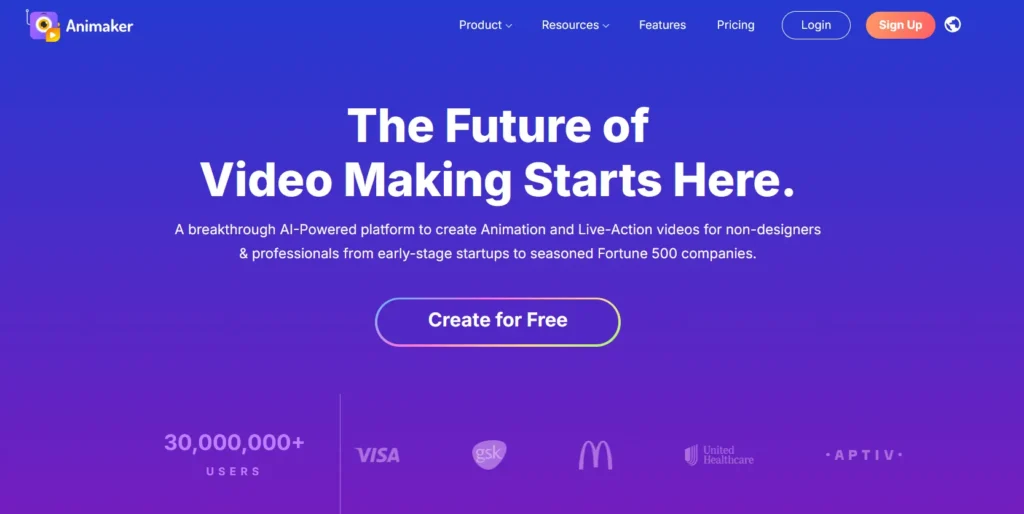
Animaker also integrates advanced voice recognition and text-to-speech features, allowing users to create lifelike narrations in multiple languages and accents. The platform’s drag-and-drop interface ensures that even beginners can produce engaging videos in minutes, while professionals benefit from tools for precise animation control, transitions, and timing.
Beyond animation, Animaker AI offers video editing, lip-sync automation, and AI script generation, making it an all-in-one creative suite for modern storytelling. Its collaboration tools also enable teams to work together in real time, making it ideal for marketing departments and content creators managing multiple projects.
With flexible pricing plans, robust AI features, and an emphasis on usability, Animaker AI continues to lead the market in AI-powered animation and video creation, empowering users to bring their ideas to life with ease and creativity.
Key Features of Animaker AI
AI Video Creation
Animaker AI is an advanced video creation platform designed to simplify and automate the video-making process using artificial intelligence. With its AI-powered tools, users can instantly generate videos from text, turning written scripts into engaging visual stories. The platform is ideal for marketing teams, educators, and content creators who want to produce professional-quality videos without prior editing experience.
Character Animation
One of Animaker AI’s standout features is its extensive library of customizable animated characters. Users can create lifelike or cartoon-style avatars with unique facial expressions, gestures, and lip-syncing that matches voiceovers. This makes it easy to bring stories, explainer videos, or corporate training materials to life through engaging animations that captivate audiences.
Text-to-Speech and Voiceovers
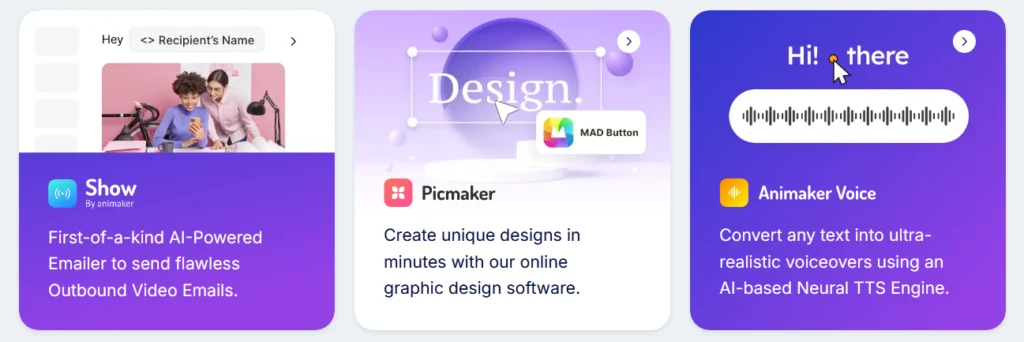
Animaker AI integrates natural-sounding AI voices to help users generate professional-quality voiceovers in multiple languages and accents. Its text-to-speech feature automatically syncs the narration with on-screen characters, ensuring precise lip movement and timing. Users can also record their own voices or upload audio files for more personalized storytelling.
Drag-and-Drop Interface
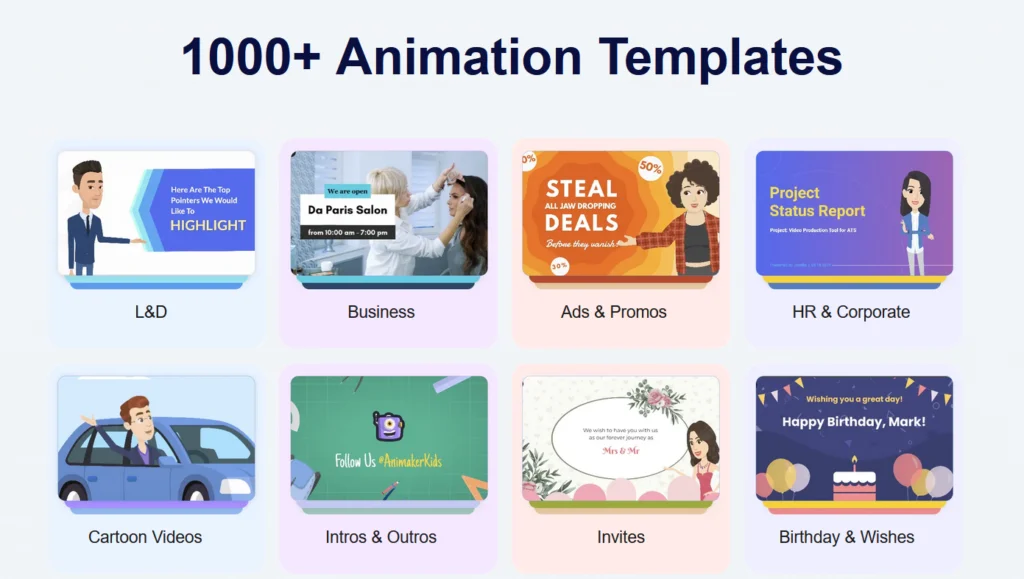
The platform’s intuitive drag-and-drop editor allows anyone to create videos quickly without technical skills. Users can easily add text, icons, backgrounds, transitions, and effects to customize scenes. Pre-built templates further simplify production, offering ready-to-use layouts for promotional videos, presentations, and social media content.
AI Script and Subtitle Generation
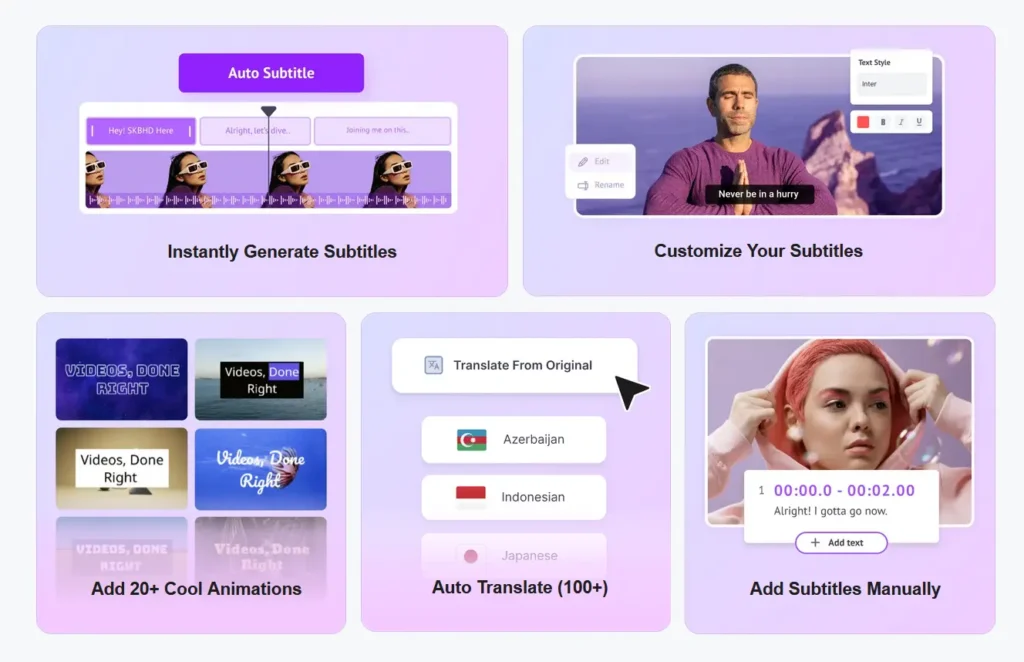
Animaker AI includes smart tools that help streamline video production, such as AI-powered script generation and automatic subtitle creation. Users can input a topic or keywords, and the AI will suggest or write complete scripts. The subtitle generator ensures accessibility and improved engagement across different audiences.
Stock Media Library
Animaker AI gives users access to an extensive stock library of over 100 million assets, including videos, photos, music tracks, and sound effects. This rich resource allows creators to enhance their projects with high-quality visuals and audio that align with their brand or message.
Collaboration and Cloud Storage
Teams can collaborate seamlessly within Animaker AI’s cloud-based environment. Users can share projects, leave comments, and make edits in real-time. The platform also stores video assets securely in the cloud, ensuring that projects are accessible anytime, from anywhere, across different devices.
AI-Powered Video Customization
For businesses and agencies, Animaker AI provides automated video personalization features. This allows users to create multiple variations of a video—customized with names, images, or logos—for marketing campaigns or targeted communications. Such automation helps brands scale video production efficiently while maintaining consistency.
Export Options and Integrations
Animaker AI supports a wide range of export formats and resolutions, from HD to 4K, suitable for different platforms like YouTube, TikTok, LinkedIn, and Instagram. It also integrates with tools like HubSpot, Mailchimp, and Google Drive, enabling smooth workflow automation and content distribution.
Security and Privacy
The platform ensures data security through encryption and compliance with GDPR standards. Users maintain full ownership of their created content, and all projects are securely backed up within Animaker’s cloud infrastructure.
Animaker AI continues to be one of the most accessible and powerful AI video creation tools on the market—bridging creativity and technology to empower individuals and businesses to produce studio-quality videos in minutes, without complex editing or design expertise.
Animaker — Performance and Animation Quality
Strengths
Ease of use & quick start: Animaker’s drag-and-drop interface, large library of templates, characters, props, music and stock media significantly lowers the barrier to entry; this makes it possible for users with little or no animation experience to produce videos quickly.
Rapid video creation for simple/standard projects: For many standard use cases — e.g., explainer videos, educational clips, social media content, internal comms — Animaker allows creators to assemble scenes, animate characters, add text/audio and export a video in a fraction of the time compared to traditional animation software.
Cloud-based and accessible: Because it runs in the browser, users can work from different devices without installing heavy software — which simplifies collaboration or remote content creation.
Built-in AI tools for speed: Features like auto lip-sync and built-in text-to-speech help speed up production by automating tasks that would otherwise be manual (voice-over, syncing audio with mouth movements).
Performance Limitations / Common Issues
Lagging, freezes or glitches on heavy/complex projects: Several user reviews report that Animaker can lag, freeze, or crash — especially when projects become large or have many scenes/characters.
Longer rendering/export times for more complex videos: Some feedback suggests that when projects grow (length, scene count, assets), export/render times increase, which can slow down the workflow.
Limitations of free plan & export constraints: The free version has restrictions (e.g., watermarks, limited features, possibly lower output quality or export limitations), which may push users toward paid plans for professional-quality output.
Animation & Visual Quality (Characters, Motion, Lip-Sync, Overall Output)
What Animaker Does Well
- 2D Character Animation with Pre-built Assets: Animaker provides a large library of characters, props, backgrounds, and templates. Users can also customize characters (hair, clothes, expressions, etc.) to suit their brand or story.
- Simplified Animation Controls (Action+, Smart Move, Scenes, Camera & Effects): Animaker offers tools like “Action+” for changing character poses/expressions, “Smart Move” for animating movement of objects or characters with less manual work, camera effects, transitions, and background/scene controls — which help produce animations that feel more dynamic and visually engaging than static slides or basic videos.
- Auto Lip-Sync & Built-in Text-to-Speech (TTS): Animaker supports AI-driven lip-syncing of characters to voiceovers (whether generated via TTS or added externally), simplifying synchronization of speech and visuals — particularly valuable when you don’t have access to voice actors or recording equipment.
- Versatile Output — Animations, Explainers, Presentations, Social Clips: Given its asset library and flexible scene/character tools, Animaker is well-suited for a variety of formats: explainer videos, educational/training content, marketing/social media clips, internal communications, etc.
Limitations & Where Quality Falls Short Compared to Professional Animation
- Restricted to 2D / Simple 2.5D — No Real 3D or Advanced Motion: Animaker does not support advanced features like true 3D character animation, complex motion-graphics, full-body rigging, physics-based animation, or frame-by-frame animation typical for professional animation software or studios.
- Simplified Visual Style — Less Realism / Stylization: Because the tool uses prebuilt 2D character rigs and animations, output tends to look “cartoon-ish” or stylized; this might be fine for explainer or educational content, but may feel simplistic or “less polished” compared to hand-drawn or studio-grade animated productions. Some users note that the video output “doesn’t look realistic” or lacks professional-level polish.
- Limited Customization Depth / Animation Complexity: While Animaker provides many options, the degree of control over animation — e.g., fine-grained control over motion timing, custom key-frames, subtle expression changes — is limited compared to full-feature animation packages. This restricts it for complex, high-detail animations.
- Potential Quality Trade-offs in Large or Complex Scenes: As projects grow in complexity (multiple characters, many scenes, background layers, effects), some users report performance slowdowns, glitches, or lowered output quality (e.g., less smooth motion, lag, rendering artifacts) — which can affect the perceived quality of the final animation.
Animaker AI Pricing Plans
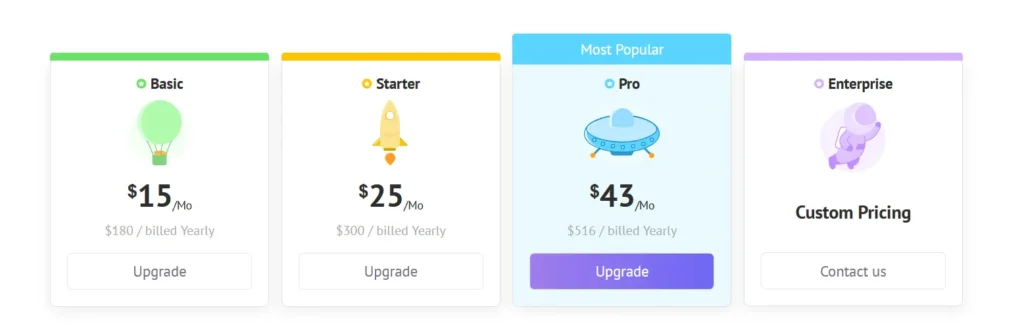
Animaker AI provides a range of pricing plans designed to suit individuals, content creators, small businesses, and enterprise teams. Its flexible model allows users to create professional-quality videos, animations, and presentations using AI-powered tools for storytelling, editing, and branding.
Free Plan
The Free Plan allows users to explore Animaker’s platform with limited access to essential tools. It includes basic video templates, up to 5 downloads per month with a watermark, and 720p video quality. Ideal for beginners or those testing the platform before upgrading.
- Basic Plan – $12.5 per month (billed annually)
Designed for individuals and small creators, the Basic Plan includes 5 premium downloads per month, 720p resolution, custom fonts, and commercial rights. Users gain access to 10 premium assets per month and the ability to export up to 5 minutes per video without a watermark. - Starter Plan – $25 per month (billed annually)
Best suited for freelancers and growing YouTube channels, the Starter Plan offers 10 premium downloads monthly, 1080p HD video quality, and access to premium templates, stock assets, and voiceovers. It includes brand customization options and up to 15 minutes of video export time. - Pro Plan – $39 per month (billed annually)
The Pro Plan caters to marketing teams and small businesses that need advanced customization and collaboration. It includes 30 premium downloads per month, 4K exports, priority rendering, and access to the full premium asset library. It also enables brand kits, subtitles, and team collaboration tools.
Enterprise Plan (Price: Custom pricing)
Tailored for large companies and production teams, the Enterprise Plan includes all Pro features plus unlimited premium downloads, dedicated account management, and advanced security options. Teams gain API access, custom integrations, and priority support for large-scale content production.
Trial and Discounts
Animaker offers a free trial with limited functionality to test its video creation tools. Annual billing provides up to 50% savings compared to monthly payments, making it a cost-effective choice for long-term users.
Animaker AI’s structured pricing ensures accessibility for casual creators while providing professional-grade capabilities for studios, educators, and businesses producing high-quality video content.
Customer Support and Service Quality — Animaker AI
Support Channels & Availability
Animaker maintains a dedicated Help Center that covers a wide range of topics: account management, billing, video editing, team collaboration, security, and more.
Users can contact Animaker via email.
Animaker also lists a toll-free phone number for U.S.-based support: +1 888-359-9292, which provides a more immediate way to escalate issues.
Self-Service Resources
Their Complete User Manual is publicly available and highly detailed, explaining key features such as character builder, team collaboration, and complex animations.
The Help Center (support portal) is well organized: users can browse FAQs, tutorial articles, and guides.
Their privacy policy explains how customer information is used in support contexts — Animaker may access personal data “to prevent or address service, security, technical issues … in connection with customer support matters.”
Service Reliability & Transparency
- Animaker’s Terms of Service explicitly state that when users contact support, their personal information may be used to respond and resolve queries.
- According to their privacy policy, Animaker is transparent about sending administrative email communications, including service-related notices.
- Animaker publicly discloses its physical address and legal entity: Animaker, Inc. is headquartered at 1160 Battery Street Suite 100, San Francisco, CA.
Strengths and Potential Limitations
Strengths:
Multiple support channels — email, phone, and a full Help Center — allow users to choose how to get help.
Comprehensive self-help resources make it easier to resolve common issues on your own.
Generally strong reputation: many users commend the support team’s responsiveness, professionalism, and patience.
Transparency on data usage: Animaker clearly explains how user data is used in support contexts, which builds trust.
Potential Limitations:
Performance-related issues: Several users mention lag, freezing, or project stability problems, which may require support intervention.
Inconsistent experiences: While many praise the support, some users find response times or problem resolution less than ideal.
Potential cost friction: Given that higher-tier plans (like Business / Enterprise) may need stronger or more reliable support, some users note that prioritization could favor paying customers.
Animaker AI offers a well-rounded and mature support system, combining a robust Help Center, email and phone contact options, and transparent data practices. User feedback is largely positive, citing responsiveness and helpfulness, though some technical reliability concerns and performance issues remain. Overall, Animaker’s customer support quality is solid and professional, especially for creators and teams building animated content at scale.
Animaker AI: Pros and Cons
Pros of Animaker AI
- Beginner-friendly animation creation: Animaker AI offers an intuitive drag-and-drop interface that allows users with no animation experience to create videos, explainer animations, and presentations quickly.
- Large library of assets: Users can access thousands of characters, templates, icons, backgrounds, and pre-animated elements, speeding up the creative workflow.
- AI-powered features: Tools such as AI script generation, auto-lip sync, text-to-speech, and automatic video editing enhance productivity and help users create professional content faster.
- Supports multiple animation styles: From 2D cartoons to motion graphics and whiteboard animations, Animaker provides flexibility for marketers, educators, and businesses.
- Exports in high resolution: Higher-tier plans allow HD and 4K downloads, making the output suitable for commercial projects and professional publishing.
Cons of Animaker AI
- Limited customization for advanced users: While ideal for beginners, Animaker’s preset-driven system can feel restrictive for animators who need granular control over movement, expressions, and transitions.
- Watermarks on free plan: The free tier includes watermarked exports and limited access to premium assets, which may not be suitable for professional use.
- Can be resource-heavy: Complex scenes or long animations may lag or require a strong device/browser to run smoothly.
- Premium plans can be costly: To unlock full AI features, advanced animations, and high-resolution exports, users must subscribe to higher-priced plans.
Animaker AI is a powerful and user-friendly platform for creating animations, making it a strong choice for marketers, educators, and small businesses that want professional results without deep animation skills. However, users seeking advanced control or budget-friendly professional features may encounter some limitations.
Animaker AI Competitors and Alternatives
In the fast-growing world of AI-driven animation and video creation, Animaker AI stands out as a beginner-friendly platform that enables users to produce animated videos, explainer content, and character-based scenes with minimal effort. Its blend of templates, AI-powered tools, and an intuitive drag-and-drop interface has made it popular among marketers, educators, and small businesses. However, the market for AI-enhanced animation tools has expanded rapidly, and several strong alternatives offer advanced character animation, automated video generation, or more robust 3D capabilities. Understanding how these competitors differ can help users choose the platform best suited to their creative and technical needs.
Vyond
Vyond is a leading animation platform focused on professional explainer videos, character animations, and business-oriented storytelling. With the introduction of Vyond Go, it now includes AI-assisted script-to-video generation.
Strengths:
Highly polished character animations and business-friendly templates;
AI script-to-video capabilities through Vyond Go;
Extensive asset library suitable for professional presentations and training content;
Considerations:
Higher pricing compared to many entry-level tools;
Less geared toward casual creators or entertainment-focused content;
Renderforest
Renderforest provides an all-in-one creative platform for animations, logos, video editing, and AI-powered content creation, making it a versatile competitor for Animaker AI.
Strengths:
Wide variety of animation templates and branding tools;
AI-powered video generation and design features;
Simple interface ideal for quick marketing videos;
Considerations:
Limited advanced control for custom animation;
Some templates can feel less flexible for unique branding needs;
Powtoon
Powtoon is a long-established platform specializing in cartoon-style animation, explainer videos, and presentation-style motion graphics, now enhanced with AI-powered features.
Strengths:
Strong focus on educational, business, and training content;
AI tools for quick video creation and workflow automation;
Easy learning curve for non-designers;
Considerations:
Not intended for detailed animation or 3D workflows;
Fewer character customization options than some competitors;
Kaiber
Kaiber focuses on AI-driven video generation and artistic animation, giving creators the ability to turn text, images, and footage into stylized motion content.
Strengths:
Strong creative and artistic transformations powered by AI;
Supports text-to-video and image-to-animation workflows;
Ideal for music videos, stylized visuals, and social-media content;
Considerations:
Not designed for traditional explainer videos or business storytelling;
Limited control over precise, frame-level animation;
Conclusion for Animaker AI review
Animaker continues to stand out as a powerful yet accessible animation platform, offering a rich blend of AI-driven tools, intuitive design, and an extensive asset library suitable for creators of all skill levels. Whether you’re producing explainer videos, educational content, or marketing visuals, the platform streamlines the entire creation process—delivering speed, convenience, and professional-quality output without the need for advanced animation expertise. This Animaker review highlights how its automation features, collaboration tools, and flexible pricing make it a practical choice for individuals, educators, and teams alike.
While Animaker does have limitations—such as performance slowdowns with complex projects and restricted customization for advanced animators—it remains one of the most efficient and user-friendly solutions in the AI animation landscape. Its continued investment in AI, template variety, and export quality ensures that users can create engaging, polished videos at scale. For anyone seeking a balance of power, usability, and creative freedom, Animaker remains a compelling tool for modern video storytelling.
Animaker AI – Frequently Asked Questions
1. What is Animaker AI?
Animaker AI is an AI-powered content creation platform that helps users generate videos, scripts, voiceovers, and design assets. It streamlines production by using machine learning tools for automation while still allowing full manual customization.
2. Do I need prior video-editing experience to use Animaker AI?
No. Animaker AI is designed for non-experts. Its drag-and-drop editor, guided prompts, and automated tools make it easy for beginners while still offering advanced features for professionals.
3. Can Animaker AI create entire videos automatically?
Yes. The AI can generate a draft video from a prompt or script, including scenes, characters, animations, and voiceovers. Users can then edit every element in the project timeline.
4. Does Animaker AI support multiple languages?
Yes. Animaker AI supports content creation in many global languages for both script generation and AI voiceovers. Availability may vary by language, but major languages are fully supported.
5. Can I upload my own media files?
Absolutely. You can import your own images, audio, and video clips and combine them with AI-generated assets and the built-in stock libraries.
6. Is the content generated by Animaker AI copyright-safe?
Content created using Animaker AI’s tools is generally safe to use for personal and commercial projects. However, you are responsible for ensuring that uploaded assets and external media comply with copyright laws. Always review licensing details for any stock resources you use.
7. Are Animaker AI’s voiceovers royalty-free?
Yes. AI-generated voiceovers are typically royalty-free and can be used in commercial projects. Some voice models may have additional terms, so check the usage guidelines in your plan.
8. What file formats can I export videos in?
Animaker AI usually allows exports in standard formats such as MP4 for video and WAV/MP3 for audio. Resolution options commonly range from 720p to 4K, depending on your subscription level.
9. How accurate is Animaker AI’s script-generation feature?
The AI produces coherent scripts based on prompts, but quality depends on the clarity of the input. Users often refine the generated script for tone, structure, or creative nuance.
10. Does Animaker AI integrate with other tools or platforms?
Yes. Animaker supports integrations for social media publishing, brand kit syncing, and certain cloud storage services. Integration availability may vary based on your account plan.
11. Can multiple team members collaborate on the same project?
Yes. Animaker AI includes collaboration features such as shared folders, project access permissions, and comment tools for team workflows. These features are included in higher-tier plans.
12. Is there a limit to how many videos I can create?
Limits depend on your subscription plan. Free plans have restrictions on export length, monthly usage, and watermark removal. Paid plans offer higher or unlimited exports.
13. How secure is the data I upload to Animaker?
Animaker follows modern security standards, including encrypted file handling and protected storage environments. Sensitive data should still be uploaded responsibly according to your organization’s policies.
14. Does Animaker AI provide templates?
Yes. The platform includes a large template library tailored for marketing, training, social media, education, and business presentations. All templates can be customized with AI tools.
15. Where can I get support if I run into issues?
Animaker provides support through an online help center, tutorials, email support, and in-product guidance. Higher-tier plans may include priority or dedicated support options.