Adobe Firefly Review (2026): A Creative-Friendly AI Tool for Designers and Content Professionals
In this Adobe Firefly review, we examine why Firefly has become one of the most widely adopted AI tools among designers, marketers, and creative teams. It helps accelerate content production without compromising quality. Firefly is deeply integrated across the Adobe ecosystem, including Photoshop, Illustrator, and Express. The platform provides an AI-powered workflow built specifically for commercial use. Safety, licensing clarity, and brand consistency are central to its design.
Adobe Firefly allows users to generate images, enhance photos, create vectors, expand backgrounds, and modify objects using natural language prompts. Features such as Generative Fill, Generative Expand, and Text-to-Vector streamline traditional creative workflows. These tools let professionals iterate quickly and produce polished results in minutes rather than hours. Because Firefly is trained on Adobe Stock and openly licensed content, it delivers a high level of commercial safety and clear attribution.
Pros:
- Commercially Safe Content
- Seamless Adobe Integration
- High-Quality, Polished Results
- Beginner-Friendly Interface
- Strong Generative Editing Tools
Cons:
- Limited Creative Boldness
- Credit-Based Limits
- Subscription Dependency
Adobe Firefly stands out as a powerful AI companion for professional creatives. It offers speed, safety, and versatility within tools many artists already rely on. For designers, marketers, and businesses wanting to leverage AI while staying in a trusted, commercial-safe ecosystem, Firefly remains one of the top solutions in 2026.
4.5
Average from 271 verified reviews
Pricing
Firefly Pro – $19.99 per month
Firefly Premium – $199.99 per month
Creative Cloud Pro – $41.99 per month
About Adobe Firefly AI
Adobe Firefly AI is Adobe’s flagship generative artificial intelligence platform. It helps creatives, designers, and businesses produce high‑quality digital content with ease. Launched as part of Adobe’s larger Creative Cloud ecosystem, Firefly uses advanced AI models to generate and edit images, video, audio, and graphic designs. Users can work from simple text prompts or other creative inputs. Its tools integrate seamlessly with Adobe applications such as Photoshop and Premiere Pro, making AI‑driven creativity accessible within familiar workflows.
The platform stands out for its commercially safe AI models. These models are trained exclusively on licensed and public domain data. This ensures that generated content can be used reliably for professional and commercial projects without copyright concerns. Firefly’s capabilities include creating detailed visuals, dynamic video clips, generating sound effects, and translating audio. It supports a broad spectrum of creative expression.
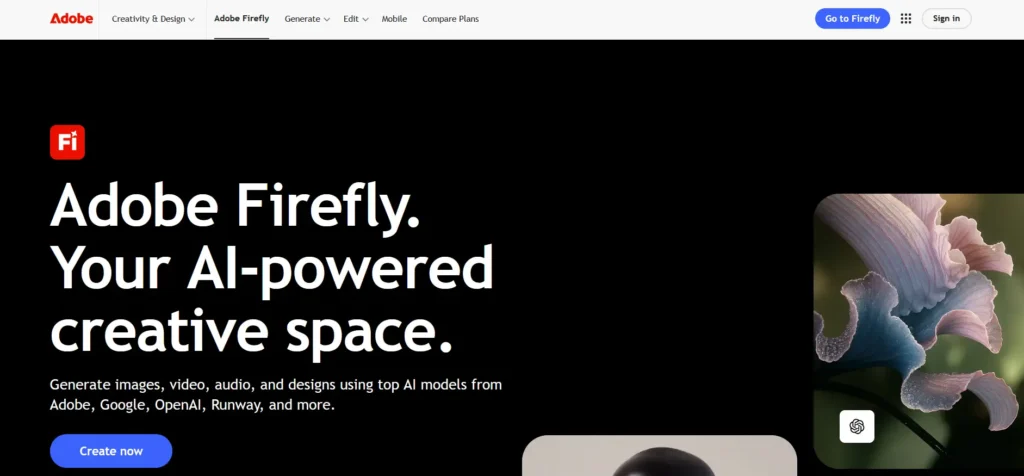
Firefly includes powerful editing features such as Generative Fill and Generative Expand. These tools let users remove, add, or extend image elements intelligently. Text to Vector and Text to Image tools turn simple prompts into polished assets. With these features, artists and marketers can iterate on creative concepts quickly, test ideas, and produce production‑ready content without starting from scratch.
Adobe offers Firefly through various subscription options. It is often integrated with Creative Cloud plans or available as standalone generative AI credits. Both individual creators and large teams can choose a plan that fits their needs. Free tiers allow users to explore core features. Paid plans unlock additional credits and advanced generative capabilities across different media types.
One key reason Adobe Firefly is a trusted choice in the generative AI space is its combination of high‑quality outputs, seamless integration with industry-standard creative tools, and professional-grade control. These features empower users to turn imagination into compelling, finished work with confidence.
Key Features of Adobe Firefly AI
Adobe Firefly AI is a powerful generative AI platform designed to help creative professionals and everyday users bring ideas to life through intuitive, safe, and production-ready content creation. Integrated into Adobe’s ecosystem and accessible via the Firefly web and mobile apps, this suite of tools supports image, video, audio, text, and vector generation — all with commercially safe models and professional control. Here’s a detailed look at the top features that make Adobe Firefly a standout creative AI platform.
Generative Image Creation
At its core, Adobe Firefly enables users to generate high-quality images from text prompts or reference visuals. The AI interprets descriptions and transforms them into detailed, original artwork or photorealistic pictures in a wide range of styles — from artistic to commercial. Firefly Image Models are designed to offer creative flexibility, control over structure and style, and output suitable for professional use.
Image Editing Tools
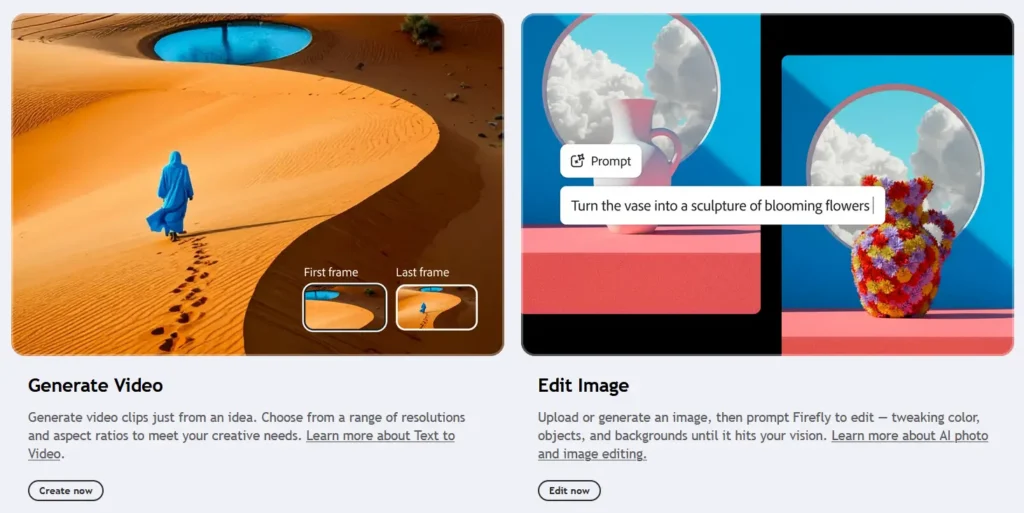
Firefly isn’t limited to creating images from scratch. It also includes powerful editing tools such as:
- Generative Fill: Add, remove, or replace elements in an existing image seamlessly.
- Generative Expand: Extend images beyond their original borders in consistent style and lighting.
- Style and Structure Reference: Guide outputs using an uploaded reference to maintain visual consistency.
These tools make image adjustment and refinement fast and intuitive.
Video Generation and Editing
Adobe Firefly has expanded beyond static images to include AI-powered video creation. The Firefly Video Model — the industry’s first commercially safe AI video generator — allows creators to automatically generate, edit, and extend video clips based on text prompts or images. Users can:
- Generate 1080p video clips from text or still images
- Control camera angles, shot composition, and motion paths
- Create atmospheric or motion graphics elements
This capability opens up new workflows for filmmakers, content creators, and editors looking to rapidly prototype or produce video content with AI.
Vector and Layout Generation
Firefly includes tools for scalable graphics and design work:
Text-to-Vector: Generate fully editable vector artwork — such as logos, icons, patterns, or packaging designs — from text prompts.
Templates and Layouts: Automatically produce customizable templates for newsletters, posters, and other design projects.
These features accelerate design iteration and help integrate generative content directly into professional workflows.
Audio and Speech Features
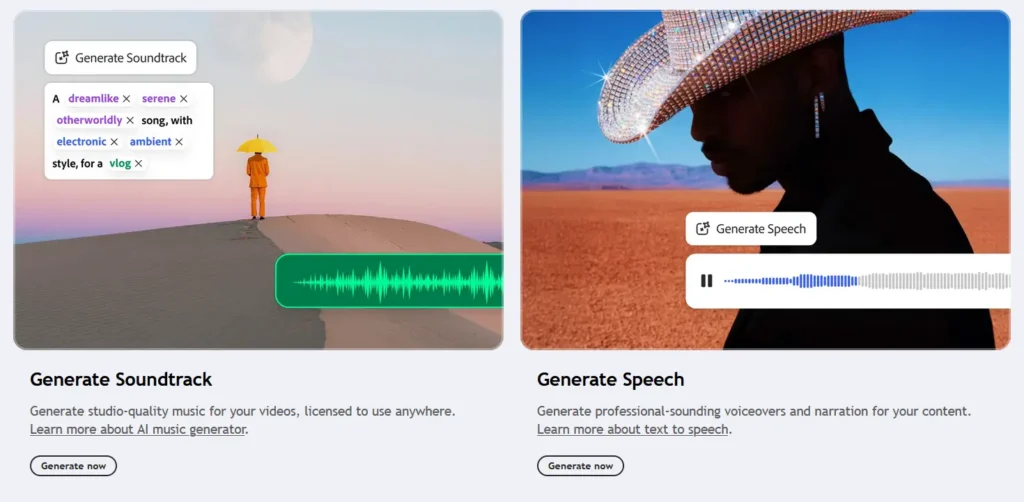
Beyond visuals, Firefly supports audio generation:
- Generate Soundtrack: Produce licensed, high-quality music tracks to match video content.
- Generate Speech: Convert text into realistic spoken word in multiple languages with emotion and tone control.
These capabilities make it easier to produce complete multimedia assets without leaving the platform.
Creative Collaboration and Ideation
Firefly offers collaborative features that support creative workflows from concept to execution:
Firefly Boards: An AI-first canvas for moodboarding, brainstorming, and organizing concepts, enabling teams to iterate and align on creative ideas in one place.
Integration with Creative Cloud: Easily move assets between Firefly and Adobe apps like Photoshop, Premiere Pro, Illustrator, and Express for refinement or publishing.
These tools simplify collaboration and help teams maintain consistency across assets and projects.
Commercial Safety and Ethical AI
One of Firefly’s core differentiators is its commitment to commercially safe outputs. Adobe trains its models on licensed Adobe Stock content, openly licensed resources, and public domain materials to ensure outputs are safe for use in commercial projects. This approach reduces concerns about copyright infringement and supports responsible AI usage.
Additionally, Firefly automatically attaches Content Credentials to generated assets, offering transparency about creation methods and tools used.
Performance and Quality — Adobe Firefly AI
Image Quality and Visual Fidelity
High Visual Accuracy and Brand Safety
Adobe Firefly AI is designed with commercial use in mind, prioritizing clean, polished outputs suitable for professional design workflows. Its image generation models are trained on licensed content, Adobe Stock assets, and public-domain material, which contributes to consistent visual quality and strong brand safety. Generated images typically feature accurate proportions, controlled lighting, and balanced compositions, making them well-suited for marketing, advertising, and editorial design.
Style Consistency and Creative Control
Firefly excels at maintaining stylistic consistency, especially when used within Adobe applications like Photoshop, Illustrator, and Express. Users can guide outputs through detailed prompts, reference styles, and layout-aware generation, which helps preserve visual coherence across campaigns or multi-asset projects. Typography handling is also stronger than many competitors, with fewer distortions in text-heavy designs.
Limitations in Artistic Variety
While Firefly produces reliable and polished visuals, some users find its outputs less experimental compared to community-driven models. Highly abstract, surreal, or niche artistic styles may feel more conservative, reflecting Adobe’s emphasis on safe, commercially viable results rather than extreme creative variance.
Speed of Rendering
Fast Generation Within Adobe Ecosystem
Adobe Firefly delivers fast rendering speeds, especially when generating standard-resolution images or applying generative fills inside Photoshop. In most cases, images are produced within seconds, allowing designers to iterate rapidly without disrupting established workflows.
Performance Tied to Cloud Processing
Because Firefly operates entirely in the cloud, rendering speed depends on server load and account tier. During peak usage, some latency may occur, particularly for larger image sizes or complex generative fill operations. However, performance generally remains consistent for Creative Cloud subscribers.
Efficient Iteration for Design Tasks
Firefly’s strength lies in iterative design rather than bulk generation. Tasks like background replacement, object removal, and style variations are processed quickly, enabling efficient refinement rather than long batch-generation sessions.
Stability of the Platform
Enterprise-Grade Reliability
As part of Adobe’s cloud infrastructure, Firefly benefits from high platform stability and strong uptime. Crashes or failed generations are relatively rare, and outputs are tightly integrated with Adobe’s file-saving and version-history systems, reducing the risk of data loss.
Seamless App Integration
Firefly’s integration into Photoshop, Illustrator, and Adobe Express enhances stability by eliminating the need for third-party exports or manual uploads. Generations occur directly within the creative environment, streamlining workflows and minimizing technical friction.
Occasional Service Slowdowns
Some users report temporary slowdowns or queued requests during major feature rollouts or peak global usage. These issues are usually short-lived and resolved quickly, reflecting Adobe’s large-scale infrastructure management.
Edge Cases Where the AI May Struggle
Highly Complex or Abstract Prompts
Firefly can struggle with extremely abstract concepts or prompts that require unconventional visual logic. Results may appear overly literal or simplified compared to more experimental generative models.
Photorealistic Human Subjects
While Firefly produces clean human imagery, subtle facial realism, emotional nuance, and natural imperfections may sometimes fall short of specialized photorealistic generators, particularly in close-up portraits.
Bulk or High-Volume Generation
Firefly is not optimized for massive batch generation. Users seeking thousands of variations quickly may find it less efficient than platforms designed specifically for large-scale image production.
Adobe Firefly AI Pricing Plans
Adobe Firefly AI is a generative artificial intelligence platform designed to help creators produce images, video, audio, and other media using AI‑driven tools — from idea to polished content. While basic access to Firefly is available for free with limited credits, full access to generative AI features and higher monthly creation capacity requires a paid subscription. Adobe’s pricing structure is built around monthly generative credits that let users consume premium AI features efficiently and at scale
The platform uses a credit‑based model where each generation task — whether creating an image, generating a video snippet, or translating media — consumes a certain number of credits. Paid plans grant larger monthly credit allocations, combined with unlimited access to standard Firefly features and additional perks like Adobe Photoshop on web and mobile or Adobe Express Premium in higher tiers.

Free Version
Adobe Firefly’s free tier allows users to experiment with the platform’s generative AI without subscribing, offering a limited monthly credit allocation that can be used for basic image and content generation. Free users still benefit from Firefly’s core capabilities, including access to standard generative workflows and introductory credit support, making it a good starting point for beginners and casual creators
However, once free credits are exhausted, users may need to wait for the monthly reset or upgrade to a paid plan for continued access to premium features like extended video generation and higher‑tier partner models. The free version is ideal for those who want to explore generative capabilities before committing to a subscription.
Paid Adobe Firefly Plans
To unlock larger credit pools, advanced generative capabilities, and premium tool access, creators can choose from several paid Firefly plans. These plans are structured based on monthly credit allowances, tool access, and integrated applications:
- Firefly Standard – $9.99 per month
Includes 2,000 generative credits per month, unlimited access to standard image and content tools, and the ability to use credits for premium image, video, and audio generation.
Best for individual creators who need moderate monthly AI generation capacity. - Firefly Pro – $19.99 per month
Offers 4,000 generative credits per month, includes all Standard features plus Adobe Photoshop on web and mobile and Adobe Express Premium.
Ideal for creators who want broader creative tools and more monthly credits. - Firefly Premium – $199.99 per month
Provides 50,000 generative credits per month and unlimited access to the Firefly Video model, as well as all features from lower tiers.
Designed for professionals and production teams needing large‑scale generation capacity.
Each paid tier grants access to Firefly across desktop, web, and mobile, along with Adobe Fonts and tutorials. Credits can be used for text‑to‑image, text‑to‑video, audio generation, and other premium workflows.
Enterprise Custom Plans
Adobe Firefly’s paid subscriptions can also integrate with larger Creative Cloud and enterprise solutions, where generative credits are bundled as part of broader creative suites. Enterprise plans typically include access to Firefly AI features alongside professional creative applications such as Photoshop, Illustrator, and Premiere Pro, with negotiated credit allocations and support terms based on organizational needs
These enterprise offerings are tailored for business users, studios, agencies, and teams requiring high‑volume creative work, centralized management, and enhanced support. Pricing and terms for enterprise plans vary depending on scale and contract agreements.
Trial and Discounts
Adobe often provides free trial periods for Firefly Standard and Pro plans, allowing new users to test premium features and experience larger monthly credit allowances before committing to a paid subscription. In addition, seasonal promotions — such as introductory discounts or bundled offers with Creative Cloud Pro — can significantly reduce the effective cost of subscription tiers for the first few months.
Annual billing options for Creative Cloud subscriptions also include Firefly access, often at a discounted monthly equivalent compared to month‑to‑month billing, making long‑term planning more cost‑effective for frequent creators.
Adobe Firefly AI: Pros and Cons
Pros of Adobe Firefly AI:
- Commercially Safe Content: Trained on licensed and public-domain data, making outputs safe for commercial use.
- Seamless Adobe Integration: Works directly within Photoshop, Illustrator, and other Creative Cloud apps.
- High-Quality, Polished Results: Produces clean, professional visuals suitable for marketing and design.
- Beginner-Friendly Interface: Easy to use while still powerful for professionals.
- Strong Generative Editing Tools: Excellent generative fill, expand, and image editing capabilities.
Cons of Adobe Firefly AI:
- Limited Creative Boldness: Outputs can feel conservative compared to more experimental AI tools.
- Credit-Based Limits: Free usage is restricted, and heavy users need paid plans.
- Subscription Dependency: Full access typically requires a Creative Cloud subscription.
Adobe Firefly AI is a reliable and business-ready generative AI solution, particularly well suited for designers and organizations that prioritize commercial safety and seamless integration with professional creative tools. Its strengths lie in polished output quality and workflow efficiency within the Adobe ecosystem. While it may feel more conservative and less customizable than some experimental AI tools, Firefly remains an excellent choice for marketing, branding, and production-focused creative work.
Adobe Firefly Competitors and Alternatives
Adobe Firefly has emerged as a powerful image-generation AI platform designed specifically for creative professionals, marketers, and businesses. In any in-depth Adobe Firefly AI review, its biggest strengths are its tight integration with Adobe Creative Cloud and its focus on text-to-image generation, generative fill, text effects, and commercially safe outputs trained on licensed and public-domain data. This makes Adobe Firefly especially attractive for professional and enterprise use cases. However, Adobe Firefly is not the only strong option in the image generation AI category. Depending on whether users prioritize ease of use, artistic flexibility, game and concept art creation, or monetizable creator platforms, several competitors and alternatives may be a better fit. Tools like Canva AI, Leonardo AI, and ImagineArt AI each offer distinct strengths that appeal to different creative audiences.
Canva AI
Canva AI integrates image generation directly into Canva’s popular design platform, making it a strong alternative for users who want fast, accessible visuals without complex workflows.
Strengths:
Extremely user-friendly interface suitable for non-designers;
Seamless integration with templates, brand kits, and marketing layouts;
Ideal for social media graphics, presentations, and quick marketing assets;
Considerations:
Limited fine-grained control compared to Adobe Firefly;
Less suitable for advanced compositing or professional design workflows;
Leonardo AI

Leonardo AI is a powerful image-generation platform popular among game developers, concept artists, and creators who need consistent styles and detailed assets.
Strengths:
Excellent for character design, game assets, and concept art;
Strong control over styles, prompts, and image consistency;
Supports custom models and fine-tuning;
Considerations:
Smaller ecosystem compared to Adobe Creative Cloud;
Less focused on traditional graphic design and marketing workflows;
ImagineArt AI

ImagineArt AI is a creative AI platform that includes text-to-image generation as part of a broader multimedia creation suite aimed at creators and marketers.
Strengths:
Supports image generation with multiple styles and model options;
Simple, browser-based workflow suitable for fast content creation;
Offers an affiliate/ambassador program, which is uncommon among image-generation competitors;
Considerations:
Not as deeply integrated into professional design tools as Adobe Firefly;
More general-purpose than enterprise-focused in licensing and workflow depth;
Conclusion for Adobe Firefly
In summary, this Adobe Firefly AI Review highlights a platform that is purpose-built for professional creatives who prioritize efficiency, reliability, and commercial safety. Firefly’s seamless integration with Adobe Creative Cloud, combined with its polished generative tools for images, vectors, video, and audio, makes it a natural extension of existing creative workflows. Its strengths lie in consistent output quality, intuitive generative editing, and licensing transparency—key factors for designers, marketers, and organizations producing content at scale.
While Adobe Firefly may not cater to users seeking highly experimental or unconventional artistic styles, its conservative approach is intentional and well-aligned with professional and enterprise needs. As emphasized throughout this Adobe Firefly AI Review, the platform excels as a production-ready AI companion that reduces creative friction without introducing legal or workflow risks. For teams and individuals looking to adopt AI responsibly within a trusted ecosystem, Adobe Firefly remains one of the most dependable solutions available.
Adobe Firefly Coupon – Save Up to 40% on AI Creative Tools
Looking to reduce the cost of Adobe’s AI-powered creative tools? Adobe Firefly is included within select Adobe plans, and Adobe regularly offers built-in savings when you choose annual billing, along with limited-time promotions that can reduce the price by up to 40% on eligible plans.
To take advantage of these offers, simply click through using your link to Adobe’s official website. Any available discounts—whether standard annual savings or active promotional deals—will be automatically reflected at checkout. It’s a great opportunity to use Adobe Firefly’s advanced generative AI features while paying less overall.
Frequently Asked Questions
1. What is Adobe Firefly AI?
Adobe Firefly AI is a generative artificial intelligence platform from Adobe that helps users create and edit images, vectors, text effects, and other creative content using natural language prompts and AI-powered tools.
2. Is Adobe Firefly AI integrated with Adobe Creative Cloud?
Yes. Firefly is tightly integrated with Adobe Creative Cloud apps such as Photoshop, Illustrator, Adobe Express, and more, enabling seamless AI workflows inside familiar design tools.
3. Can the content generated by Adobe Firefly be used commercially?
Yes. Adobe Firefly’s models are trained on licensed and public-domain data, and Adobe provides commercial usage rights for output created under paid plans, making it suitable for business design and production use.
4. Does Adobe Firefly AI require a subscription?
Adobe Firefly offers free access with limited credits and features, but full access to advanced models, higher-resolution generation, and enhanced features typically requires a paid Creative Cloud subscription or Firefly credits.
5. What types of content can Adobe Firefly generate?
Firefly can generate images from text prompts, enhance photos, expand backgrounds, create vector graphics, produce text effects, and even generate short video clips and audio elements depending on plan access.
6. What is Generative Fill in Adobe Firefly?
Generative Fill is a feature that allows users to add, remove, or replace elements in an existing image using text prompts while maintaining consistent lighting, perspective, and style.
7. Does Adobe Firefly AI generate images from text?
Yes. Firefly uses text-to-image models that turn user descriptions into original visuals, offering flexibility in style, composition, and mood.
8. Is Adobe Firefly safe for use in professional environments?
Yes. Adobe Firefly prioritizes commercially safe generation by training exclusively on licensed and public-domain content, reducing the risk of copyright infringement in commercial projects.
9. Can Adobe Firefly generate vectors for design work?
Yes. Firefly’s Text-to-Vector tools allow users to generate editable vector artwork, such as logos, icons, and patterns, directly from prompts.
10. Does Firefly support video generation?
Adobe Firefly includes AI video generation capabilities that can generate and edit video clips based on text prompts or existing media (availability may depend on subscription tiers).
11. Can Firefly be used for audio or music creation?
Firefly supports audio generation features such as generating soundtracks or voiceovers from text, expanding its functionality beyond static visuals.
12. Is Firefly suitable for beginners with no design experience?
Yes. Firefly is designed to be accessible for beginners, with intuitive prompts and user-friendly interfaces, though advanced users can also use it within professional workflows.
13. Does Adobe Firefly work offline?
No. Firefly operates through cloud processing, so an active internet connection is required to generate and edit content.
14. Can Firefly be used inside Photoshop or Illustrator?
Yes. Firefly features like Generative Fill and text-based generation are embedded into Adobe Photoshop and Illustrator, allowing users to work within their existing design projects.
15. What file formats does Adobe Firefly support for exports?
Firefly supports exporting assets in common formats such as PNG, JPEG, SVG (for vectors), and video export formats, depending on the type of generated content and the application used.