Pictory Review (2025): AI-Powered Video Creation Made Effortless
In this Pictory Review, we take a close look at one of the most powerful AI-driven video creation platforms available in 2025. Pictory is designed to help creators transform written content into high-quality videos quickly and effortlessly, making it an ideal solution for marketers, content creators, and businesses alike.
Built with speed, simplicity, and automation in mind, Pictory enables users to convert scripts, blog posts, and articles into engaging videos complete with AI voiceovers, premium stock footage, and dynamic captions. Its intuitive interface and robust editing features ensure that both beginners and professionals can produce polished, professional-looking videos without prior video editing experience.
Pros:
- User-Friendly Interface
- Wide Range of Templates
- Automated Captions and Subtitles
- Branding and Customization Tools
- Cloud-Based Platform
- Great for Repurposing Content
Cons:
- Limited Advanced Editing
- Voiceovers Can Sound Robotic
- Dependency on Stock Footage
- Pricing Can Add Up
- Occasional AI Errors
4.8
Average from 314 verified reviews
Pricing
Starter plan – $25 per month
Professional plan – $35 per month
Team plan – $119 per month
About Pictory
Pictory is a cloud-based video creation platform designed to help marketers, content creators, and businesses transform written content into engaging videos with ease. Using advanced AI technology, Pictory simplifies the video production process, making it accessible to users without technical or editing expertise.
A key feature of Pictory is its ability to convert scripts, blog posts, or articles into high-quality videos automatically. The platform intelligently selects visuals, adds background music, and generates captions, significantly reducing the time and effort required for video creation. It also offers a range of customizable templates and branding options to maintain visual consistency across all content.
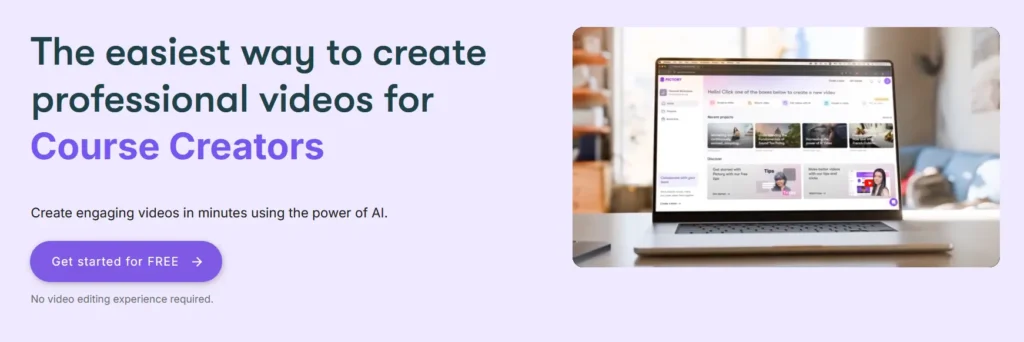
In addition to text-to-video functionality, Pictory supports features like automatic subtitle generation, voiceovers, and scene editing, allowing users to polish their videos with minimal manual adjustments. Videos can be exported in various formats and aspect ratios, making them suitable for platforms such as YouTube, Instagram, TikTok, and LinkedIn.
Pictory operates on a subscription basis and includes access to a rich media library of royalty-free images, video clips, and music tracks. Users benefit from regular platform updates, helpful tutorials, and responsive support, making Pictory a valuable tool for streamlining content marketing and visual storytelling.
Pictory Features
Pictory is an AI-powered video creation tool designed to help users turn long-form text content into engaging, branded videos in just a few clicks. Ideal for marketers, educators, and content creators, Pictory combines ease of use with powerful automation features. Here’s what you can expect:
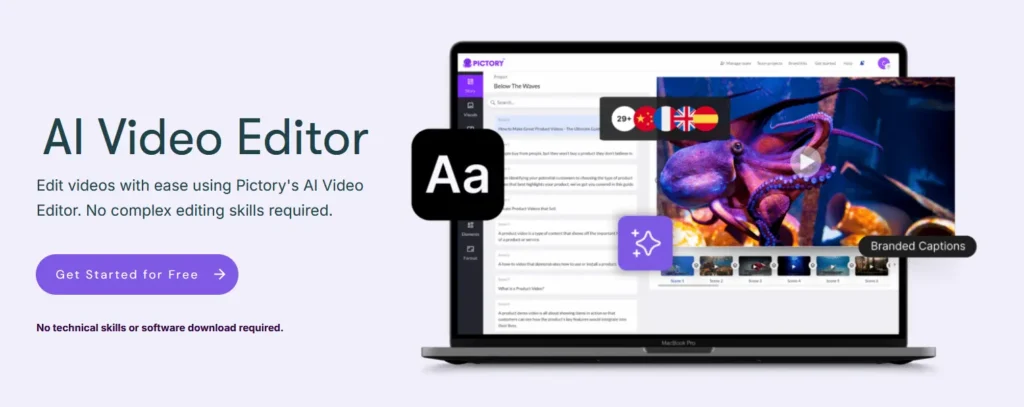
Script-to-Video Conversion:
Quickly transform written scripts or blog posts into professional-quality videos. Pictory automatically scans your content, summarizes key points, and selects relevant visuals to match your narrative. This feature is perfect for repurposing articles into YouTube or social media videos.
Text and Visual Editing:
Customize scenes with drag-and-drop simplicity. You can edit on-screen text, change visuals, add or remove scenes, and modify background music. Pictory also supports scene transitions, making it easy to polish the overall look and feel of your video.
Automatic Subtitles and Captions:
Improve accessibility and engagement with automatically generated captions and subtitles. Pictory provides editing tools to correct or refine the transcript, and you can download subtitle files separately if needed.
Voiceover Options:
Choose from a variety of AI-generated voiceovers in multiple accents and languages, or upload your own voice recordings. You can also sync the voiceover timing with each scene for a natural flow.
Brand Kit and Templates:
Maintain visual consistency with pre-designed templates and a brand kit that includes logos, fonts, and custom color schemes. This feature ensures your videos stay aligned with your brand identity across all platforms.
Multiple Video Formats:
Create videos in landscape, portrait, or square format to suit YouTube, Instagram Reels, TikTok, Facebook, and LinkedIn. Pictory automatically optimizes layout elements for each platform.
Stock Media Library:
Access millions of royalty-free stock videos, images, and music tracks through Pictory’s built-in media library. You can easily search and insert relevant assets into your video without needing an external subscription.
Team Collaboration:
Pictory allows for collaborative video editing by enabling multiple users to work on the same project, making it a great option for teams or agencies managing multiple clients.
Analytics and Export Settings:
Monitor video performance with basic insights, and export videos in HD quality. Pictory supports MP4 exports and allows users to control resolution, aspect ratio, and file size settings.
Cloud-Based and Regular Updates:
Since Pictory is entirely cloud-based, there’s no need to install software. All updates, new features, and enhancements are rolled out automatically, ensuring you always have access to the latest tools without manual downloads.
With its comprehensive suite of features, Pictory provides a streamlined solution for producing professional, shareable video content quickly and efficiently.
Ease of Use
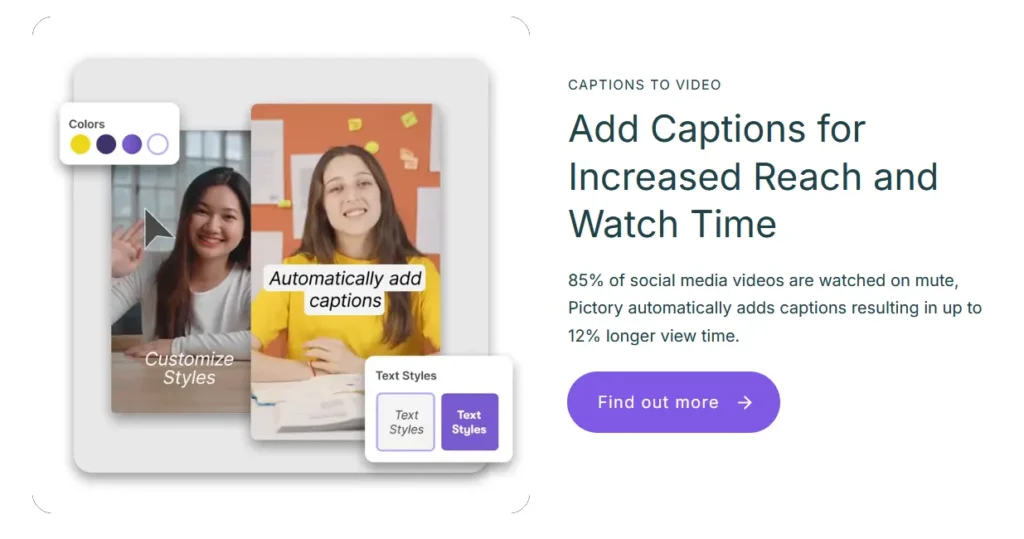
One of Pictory’s strongest selling points in 2025 remains its user-friendly design. Whether you’re a complete beginner or a busy professional looking to streamline video production, Pictory’s interface and workflow are built with simplicity and efficiency in mind.
User Interface and Navigation
Pictory features a clean, minimalistic interface that emphasizes clarity over complexity. Upon logging in, users are greeted with a well-organized dashboard offering clear entry points for the main functions: Script to Video, Article to Video, Edit Videos Using Text, and Visuals to Video. Each workflow is laid out in a step-by-step format, making it easy to follow even without prior video editing experience.
Menus are intuitive, with helpful icons and tooltips, and the platform doesn’t overwhelm users with unnecessary features. The left-hand panel provides access to scenes, visuals, audio, and branding tools, while the central canvas displays real-time previews. This allows users to keep control of the content while remaining focused on creativity.
Learning Curve for New Users
Pictory is designed for non-editors—marketers, coaches, social media managers, and small business owners—so the learning curve is remarkably gentle. Most users can produce a complete video within their first session, thanks to in-app prompts, pre-written script examples, and video walkthroughs.
The platform also provides onboarding tutorials and a help center with step-by-step guides and FAQs. Unlike traditional video editing software that might require days or weeks to master, Pictory enables new users to feel confident and productive in under an hour.
Drag-and-Drop Functionality and Workflow
The drag-and-drop editor is central to Pictory’s workflow. Users can rearrange scenes, add new media, or drop audio tracks onto the timeline with ease. Visuals are automatically matched to text, but can be swapped or adjusted manually with a few clicks. Background music, subtitles, and voiceovers are integrated seamlessly through drag-and-drop panels.
The linear workflow keeps things simple: import content → edit scenes → add branding and voice → preview and export. There’s little room for confusion, and the entire process is built to save time without sacrificing quality.
For users who are tired of complex video editors or endless timelines, Pictory’s structured and intuitive system is a refreshing change that puts speed and clarity first.
Pictory AI Pricing
Pictory AI offers a range of pricing plans tailored to meet the needs of individual content creators, professional video marketers, and large enterprises. While there is no permanent free plan, Pictory provides a free trial allowing users to explore its features before committing to a subscription.
Paid Pictory AI Plans
To access the full range of Pictory features—including watermark-free downloads, high-definition exports, premium ElevenLabs AI voices, and team collaboration tools—users must subscribe to one of the paid plans.
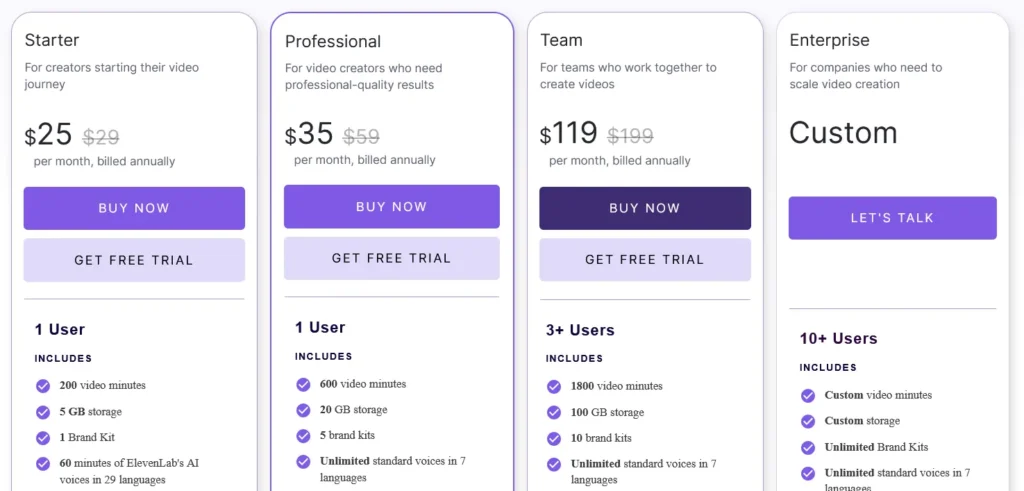
The Pictory AI plans are structured as follows:
- Starter Plan – $29 per month (billed monthly) / $25 (annually)
Designed for creators starting their video journey. It includes 200 video minutes per month, 5 GB of storage, and 1 Brand Kit. Users get 60 minutes of ElevenLabs AI voices, access to 5 million stock videos, and 100 AI Credits to generate images, videos, or avatars. - Professional Plan – $59 per month (billed monthly) / $35 (annually)
Ideal for creators who need professional-quality results. This plan offers 600 video minutes per month, 20 GB of storage, and 5 brand kits. It includes 120 minutes of ElevenLabs AI voices, access to a massive library of 18 million stock videos, and 1,000 AI Credits. It also unlocks advanced AI tools like video summarization. - Team Plan – $199 per month (billed monthly) / $119 (annually)
Tailored for teams that collaborate on video projects. It supports 3+ users and includes 1,800 video minutes per month, 100 GB of storage, and 10 brand kits. Teams benefit from 240 minutes of ElevenLabs voices, 2,400 AI Credits, a shared workspace for assets, and professional onboarding. - Enterprise Plan – Custom Pricing
For large companies scaling video creation. This plan supports 10+ users with custom limits for minutes, storage, and AI credits. It includes “Pictory Central” for interactive video hosting (quizzes, CTAs, SCORM export), SSO integration, a dedicated success manager, and early access to beta features.
All plans include regular platform updates, cloud-based rendering, and access to Pictory’s extensive library of AI voices and stock media.
Free Trial
Pictory provides a Free Trial that allows new users to experience the platform’s professional capabilities without an upfront payment. This trial offers a hands-on look at the premium features, including:
- Script-to-Video Generation
- Access to Premium Stock Media
- ElevenLabs AI Voices
Users can create and edit videos directly from their browser, exploring features like automatic captioning and AI-powered editing. This makes it an accessible option for those looking to evaluate Pictory’s efficiency and output quality before committing to a paid plan.
Pictory Customer Support and Service
Pictory offers a customer support experience designed to assist users at every stage of their video creation journey, whether they’re beginners or seasoned content creators. With a focus on accessibility and responsiveness, Pictory’s support and service options are tailored to ensure a smooth and productive user experience.
Live Chat Support:
Pictory provides live chat assistance directly within the platform, allowing users to quickly connect with support representatives for help with technical issues, feature explanations, or troubleshooting. While not available 24/7, response times are generally prompt during business hours.
Email Support:
For more complex inquiries or off-hours assistance, users can reach out via email. The support team typically responds within 24 hours, offering detailed and helpful guidance tailored to the user’s specific problem or request.
Extensive Help Center:
Pictory maintains a comprehensive online knowledge base that includes step-by-step tutorials, frequently asked questions, and video walkthroughs. Topics range from getting started and editing basics to branding customization and exporting content, making it easy for users to find answers independently.
Video Tutorials and Webinars:
To support users in mastering the platform, Pictory offers a collection of video tutorials and occasional live webinars. These resources provide valuable insights into advanced features, best practices, and creative tips for maximizing video impact.
Community Support:
Pictory has a growing online user community, including a private Facebook group where users can share experiences, ask questions, and get advice from peers and the Pictory team. This peer-to-peer support network adds an extra layer of help, especially for brainstorming and creative inspiration.
Onboarding and Training (for Teams):
For business or enterprise accounts, Pictory offers onboarding support and personalized training sessions to help teams learn the platform efficiently and align video creation with their marketing or branding goals.
Pros and Cons of Pictory
Pros of Pictory:
- AI-Powered Video Creation – Pictory automatically transforms blog posts, scripts, or text into engaging videos, saving hours of manual editing and production time.
- User-Friendly Interface – Designed with simplicity in mind, Pictory makes it easy for beginners to create professional-looking videos without prior video editing experience.
- Wide Range of Templates – Users have access to a large library of video templates, styles, and stock assets to customize their content for various platforms and audiences.
- Automated Captions and Subtitles – Pictory includes auto-generated captions and subtitles, improving accessibility and engagement, especially on social media.
- Branding and Customization Tools – The platform allows users to add logos, color schemes, and fonts to maintain consistent branding across all video content.
- Cloud-Based Platform – No downloads or software installations are needed, and projects can be accessed from any device with internet access.
- Great for Repurposing Content – Pictory is ideal for turning long-form written content into bite-sized video snippets, making it easier to share on YouTube, LinkedIn, TikTok, and more.
Cons of Pictory:
- Limited Advanced Editing – While Pictory is excellent for quick content creation, it lacks the granular editing features that professional video editors might need.
- Voiceovers Can Sound Robotic – Although improving, the AI voiceovers may not sound as natural or emotive as human narration, especially for storytelling or emotional content.
- Dependency on Stock Footage – The heavy reliance on stock video can result in generic-looking content if not customized thoughtfully.
- Pricing Can Add Up – While affordable for businesses, the subscription pricing may be a barrier for hobbyists or casual users who only need occasional videos.
- Occasional AI Errors – Automatic scene selection and text-to-video conversion can sometimes misinterpret context, requiring manual adjustments to ensure accuracy.
Pictory AI Competitors and Alternatives
Pictory AI has become a popular solution for transforming scripts, blog posts, and long-form content into short, engaging videos using AI automation. Its features—such as automatic scene creation, voiceovers, transcription, and text-to-video—make it a strong tool for marketers, educators, and content creators who need fast video production without advanced editing skills. However, depending on whether users need more customization, more realistic AI avatars, or more cinematic video generation, several strong alternatives offer competitive capabilities. From advanced AI video platforms to all-in-one content creation suites, exploring these options can help users find the best fit for their workflow.
Synthesia
Synthesia is a leading AI video generation platform known for its realistic AI avatars and studio-like presentation videos.
Strengths:
High-quality AI avatars and lip-syncing;
Script-to-video workflows ideal for tutorials and training content;
Large library of avatars, templates, and languages;
Considerations:
Best suited for talking-head videos rather than cinematic or social media formats;
Limited creative control compared to traditional video editors;
InVideo
InVideo offers a powerful text-to-video engine and extensive templates, making it a strong competitor for fast content creation.
Strengths:
Large template library for social, marketing, and promotional videos;
Strong text-to-video capabilities;
Easy-to-use editing interface;
Considerations:
Fewer AI automation features compared to Pictory;
Some advanced editing tools are limited compared to professional video software;
Descript
Descript is an AI-driven audio and video editing tool that focuses on transcription-based editing and content repurposing.
Strengths:
Industry-leading transcription and overdub voice cloning;
Edit video simply by editing text;
Ideal for podcasts, interviews, and long-form content;
Considerations:
Not designed for template-based or cinematic AI video generation;
Requires some editing familiarity;
Runway

Runway is a high-end AI video generation platform used for creative, cinematic, and experimental content.
Strengths:
Advanced generative video models (gen-1, gen-2);
Strong motion and image-to-video capabilities;
Powerful tools for creators, animators, and filmmakers;
Considerations:
Less suitable for business-style or presentation videos;
Requires more technical understanding than Pictory;
Conclusion for Pictory Review
This Pictory Review demonstrates that Pictory is a highly efficient and user-friendly AI-powered video creation platform that simplifies the process of transforming text content into professional-quality videos. With features like script-to-video conversion, automated captions, AI-generated voiceovers, and a rich stock media library, Pictory enables marketers, educators, and content creators to produce engaging videos quickly without needing advanced editing skills. Its cloud-based interface, intuitive drag-and-drop workflow, and branding tools further enhance the user experience, making it accessible for both beginners and teams aiming to maintain consistency across multiple video projects.
Pictory’s automation capabilities, combined with its wide range of templates and multi-platform export options, make it an excellent tool for repurposing blog posts, articles, and scripts into dynamic video content. While limitations such as occasional AI errors, robotic-sounding voiceovers, and dependence on stock footage exist, the platform’s speed, ease of use, and consistent updates outweigh these drawbacks. For freelancers, small businesses, and large teams seeking an effective, scalable solution for video marketing and content repurposing, this Pictory Review confirms that Pictory is a valuable and forward-looking investment in AI-driven video creation.
Pictory Coupon – Save Up to 50% on AI Video Creation Tools
Looking to cut costs on your AI video editing and creation software? Pictory regularly offers built‑in savings on annual plans, and during special promotions you can save up to 50% off select subscriptions, including deep discounts on yearly pricing compared to monthly rates.
To take advantage of these offers, simply click through to Pictory’s official website using your link. Any available discounts — whether standard annual savings or limited‑time promotional deals — will be automatically reflected at checkout. It’s a great opportunity to access Pictory’s powerful AI video tools while paying less overall.
Frequently Asked Questions
1. What is Pictory?
Pictory is an AI-powered online video creation and editing platform that lets you turn text, URLs, images, PPTs or existing videos into professional videos quickly — without traditional editing skills. It’s designed for marketers, educators, content creators, and businesses.
2. Do I need video editing experience to use it?
No. Pictory is beginner-friendly and automates many editing tasks (scene creation, captions, voiceovers). That makes it accessible even if you’ve never used video editing software before.
3. Is there a free version or trial?
Yes. Pictory offers a free trial (usually 14 days) that lets you test most premium features before subscribing. During the trial, you can create videos but downloads may be limited until you subscribe.
4. How much does Pictory cost?
Pictory has multiple plans — Starter, Professional, Teams, and Enterprise — with increasing video minute limits, access to premium stock media, collaboration features and more advanced AI tools. Annual billing usually offers discounted pricing.
5. What types of input can I use to make videos?
You can create videos from:
- Text or script
- Blog/URL (URL-to-video)
- Uploaded videos
- Images or clips
- PowerPoint slides
It also supports recording directly in the platform.
6. Can Pictory automatically generate captions and transcripts?
Yes. Pictory automatically transcribes spoken or uploaded text and generates captions that you can edit and customize. This also helps accessibility and engagement.
7. What video formats and lengths are supported?
Exported videos are in MP4 format. Maximum video duration depends on the plan and feature you’re using (e.g., longer videos in paid plans).
8. Can I add voiceovers?
Yes. You can use built-in AI voices (multiple languages and accents) or upload your own voiceover audio. Voiceover sync options vary with plan and feature.
9. Does Pictory support brand customization?
Yes. You can add your brand logo, colors, fonts, and styles — helping maintain a consistent brand identity across videos.
10. Can I convert PowerPoint slides into videos?
Yes. Pictory can convert PPT/PPTX slides into videos (keeping animations/transitions), and you can edit the result further — including voiceovers, branding, and timing.
11. Are stock videos and music licensed for commercial use?
Yes. Pictory includes access to large libraries of stock visuals and music that are pre-licensed for use in your video projects.
12. Can I use Pictory videos for YouTube or commercial projects?
Yes. Videos created with Pictory can be monetized on platforms like YouTube or used in marketing — just check individual stock asset licenses for premium clips.
13. Is a mobile app available?
No. Pictory currently works in desktop web browsers only; there’s no standalone mobile app yet.