Kinsta Hosting review (2026): Premium Managed WordPress Hosting for Speed and Security
Search for “best managed WordPress hosting,” and you’ll frequently see Kinsta among the top recommendations. Powered by Google Cloud’s premium infrastructure, Kinsta has built a reputation for delivering high-speed performance, top-tier security, and hassle-free scalability. This Kinsta review takes a closer look at what makes the platform one of the leading choices for businesses and developers seeking premium managed WordPress hosting.
Unlike traditional shared hosting providers, Kinsta exclusively offers managed WordPress hosting, meaning it’s optimized specifically for WordPress websites. From automatic daily backups to enterprise-grade DDoS protection, Kinsta takes care of technical complexities so users can focus on growing their sites. As this Kinsta review shows, the platform’s combination of performance, reliability, and user-friendly management tools makes it an excellent option for anyone who values speed and stability.
Pros:
- High Performance and Speed
- Managed WordPress Hosting
- Global Infrastructure
- Advanced Security
- Developer-Friendly Tools
- Expert 24/7 Support
- User-Friendly Dashboard
Cons:
- Higher Cost
- WordPress-Only Hosting
- No Email Hosting
- Learning Curve for Beginners
- Limited Free Trial
4.6
Average from 144 verified reviews
Pricing
Single Site Plan – $35 per month
Multiple Sites Plan – $70 per month
Agency Plans – Starting at $340 per month
Kinsta is a U.S.-based managed WordPress hosting provider founded in 2013. With a focus on speed, scalability, and expert support, Kinsta caters to users who demand high performance and smooth site management. But is it the right host for your needs?
- Speed: How fast do websites load on Kinsta’s cloud infrastructure?
- Performance: Can Kinsta handle high-traffic websites and sudden traffic spikes?
- Reliability: Does Kinsta consistently meet its 99.9% uptime guarantee?
- Customer Support: Is Kinsta’s support team responsive, knowledgeable, and available 24/7?
- Features: Are essential tools like backups, staging, and security included?
- Pricing: Are Kinsta’s premium plans worth the cost for long-term value?
This comprehensive Kinsta Hosting review breaks down the pros and cons to help you decide if it’s the best fit for your website. If you’re short on time, check out our quick Kinsta scorecard and verdict below.
Kinsta Review Summary
| Performance Grade: | A+ |
| Average Load Time: | 543 ms |
| Average Response Time: | 47.6 ms |
| Free Domain: | No |
| Free SSL: | Yes |
| One-Click WordPress Installation: | Yes |
| Support Options: | Phone, Live Chat, Knowledge Base |
One thing to consider: while Kinsta provides premium hosting with exceptional support, its pricing may be higher than budget-friendly alternatives. Additionally, since Kinsta only supports WordPress, users looking for general web hosting or email services will need separate solutions.
Kinsta is an excellent choice for businesses, agencies, and high-traffic websites that prioritize speed, security, and reliability. But for those on a tight budget or needing broader hosting options, alternative solutions might be worth exploring.
About Kinsta
Kinsta is a premium managed WordPress hosting provider founded in 2013. Known for its performance-oriented infrastructure and customer-first approach, Kinsta has rapidly grown to become a leading choice for developers, businesses, and high-traffic websites. Unlike traditional hosting providers, Kinsta focuses solely on WordPress hosting, offering top-tier managed services tailored to the needs of WordPress users.
Kinsta uses Google Cloud’s premium tier to power its hosting, providing users with blazing fast speeds, security, and scalability. With a network of servers located in multiple data centers across the world, Kinsta ensures that websites are delivered quickly and securely no matter where visitors are located. The platform is designed to optimize WordPress performance with built-in features such as automatic backups, caching, and enhanced security.

The company also prides itself on offering excellent customer support, with a team of WordPress experts available 24/7 via live chat. Kinsta’s hosting plans cater to a wide range of users, from individual bloggers to large enterprises, with a focus on providing high-quality service for high-traffic websites.
Kinsta is known for its innovative features such as automatic scalability, staging environments, and integrated developer tools, making it a popular choice for WordPress professionals. While it may come with a higher price tag than shared hosting providers, Kinsta’s exceptional performance, support, and features make it a solid choice for serious WordPress users.
Kinsta Features
Managed WordPress Hosting
Kinsta offers fully managed WordPress hosting designed for speed, reliability, and ease of use. Unlike traditional shared hosting, Kinsta’s infrastructure is built on the Google Cloud Platform’s premium tier network, which ensures fast load times and high availability. Every site is hosted in an isolated container environment powered by LXD technology, providing dedicated resources for CPU, RAM, and PHP workers. This setup eliminates the risks associated with shared resources, delivering consistent performance even during high-traffic periods.
Application and Database Hosting
In addition to WordPress, Kinsta now supports application and database hosting, allowing developers to deploy and manage apps built with popular frameworks like Node.js, Django, and Laravel. The platform offers a developer-friendly dashboard, Git integration, and support for Docker-based deployments. Kinsta’s managed database hosting supports PostgreSQL, MySQL, Redis, and MariaDB, offering flexibility for modern web applications that require secure, scalable data management.
Performance Optimization
Kinsta’s performance is enhanced by a range of optimization features. It uses Google’s C2 and C3D compute-optimized machines, NGINX, MariaDB, and HTTP/3 for superior speed and stability. Each plan includes a built-in content delivery network (CDN) powered by Cloudflare, providing global edge caching across 260+ locations. Automatic scaling and resource isolation ensure that traffic surges don’t impact site performance, making Kinsta suitable for high-demand sites and e-commerce stores.

Security Features
Security is a central focus of Kinsta’s managed environment. All plans include Cloudflare Enterprise integration, offering DDoS protection, a web application firewall (WAF), and free SSL certificates. Kinsta also provides automatic daily backups, two-factor authentication (2FA), and hack-fix guarantees, ensuring that compromised sites are restored quickly and securely. The platform continuously monitors uptime and security events, giving users peace of mind that their sites are protected 24/7.
Developer Tools
Kinsta caters to developers with a suite of professional tools that simplify management and deployment. Features include SSH access, WP-CLI, Git integration, and staging environments for safe testing before going live. Users can also manage PHP versions directly through the MyKinsta dashboard and utilize Redis caching and New Relic monitoring for advanced performance insights. These tools make Kinsta particularly appealing to agencies and development teams managing multiple client sites.
Website Management and Migration
The MyKinsta dashboard provides an intuitive control panel for managing websites, analytics, backups, and users. It replaces traditional tools like cPanel with a cleaner, performance-focused interface. Kinsta also offers free website migrations handled by experts, ensuring a smooth transition from other hosting providers without downtime. Users can track migration progress directly from the dashboard, simplifying the setup process.
Global Data Centers and CDN
Kinsta provides 35+ global data center locations, allowing users to host sites closer to their target audience for reduced latency and faster load times. Paired with the Cloudflare CDN, content is distributed efficiently across a global edge network, ensuring consistent speed and performance worldwide.
Overall, Kinsta Hosting combines cutting-edge technology, powerful developer tools, and premium support to deliver a fast, secure, and scalable hosting experience. Its managed approach removes the technical burden from users, making it an ideal choice for WordPress professionals, developers, and growing businesses seeking reliable performance without compromise.
Performance and Speed
Google Cloud Infrastructure
Kinsta’s hosting performance is built on the Google Cloud Platform’s premium tier network, ensuring exceptional speed, reliability, and scalability. Unlike many traditional hosts that rely on shared or budget cloud environments, Kinsta utilizes compute-optimized C2 and C3D virtual machines—Google’s fastest servers available for web hosting. This infrastructure allows websites to benefit from low-latency connections, faster data transfers, and improved global reach. Each site runs in an isolated container, guaranteeing dedicated resources for CPU, RAM, and PHP workers without interference from other users.
Edge Caching and CDN Integration
To maximize global performance, Kinsta includes Cloudflare Enterprise CDN with all hosting plans. This integration delivers edge caching from over 260 data center locations worldwide, ensuring that content is served from the nearest geographic location to each visitor. The result is faster load times, reduced latency, and improved performance consistency for international audiences. The CDN also supports HTTP/3 and smart routing for optimal delivery speed.
Website Load Times and Optimization
Kinsta consistently ranks among the fastest managed WordPress hosts in independent performance tests. Websites hosted on Kinsta benefit from optimized server configurations using NGINX, MariaDB, PHP 8+, and object caching through Redis. These technologies are fine-tuned specifically for WordPress, allowing pages to load quickly even under heavy traffic. Kinsta’s automatic resource scaling ensures that when visitor numbers surge, the system allocates more computing power seamlessly—without downtime or throttling.
Uptime Guarantee and Reliability
Kinsta offers a 99.9% uptime guarantee, supported by real-time infrastructure monitoring. Each website is checked every two minutes (720 times per day) to detect issues proactively. In the event of downtime or performance degradation, Kinsta’s engineers are automatically alerted and respond immediately. This reliability is further reinforced by Google Cloud’s redundant architecture, ensuring that hardware or network failures do not affect site availability.
Global Data Centers
With 35+ data center locations across North America, Europe, Asia-Pacific, and South America, Kinsta allows users to choose where their websites are physically hosted. This global distribution reduces latency and helps maintain optimal site performance for visitors worldwide. Each data center benefits from Google’s premium tier network, offering superior routing and faster content delivery compared to standard-tier cloud hosts.
Kinsta Plans
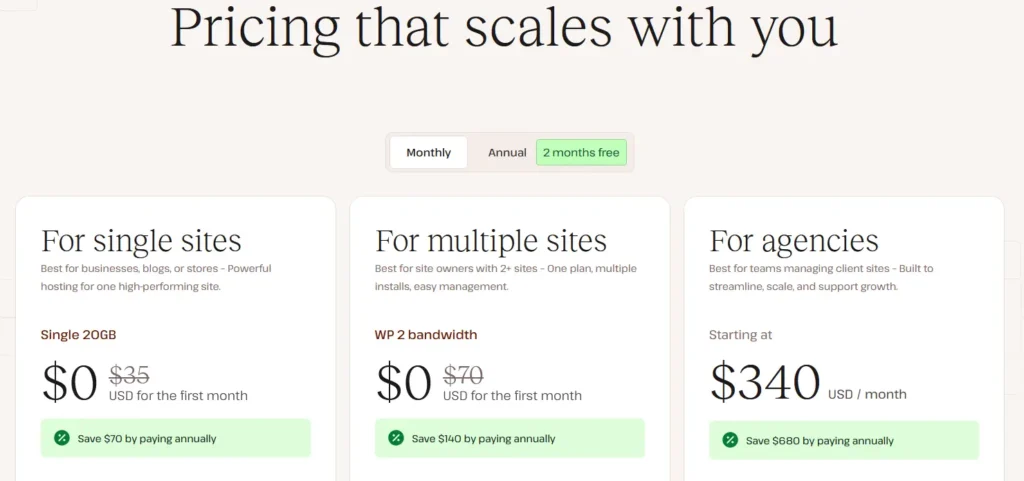
Kinsta offers managed WordPress hosting plans suitable for single sites, multiple sites, and agencies. All plans include Google Cloud infrastructure, free CDN, daily backups, and expert support. Users can try the Single and Multiple site plans for free for the first month.
Here’s a breakdown of Kinsta’s pricing and what’s included in each plan:
Free Trial
The free trial is available for the Single Site and Multiple Sites plans. Users can try Kinsta’s managed hosting features, including automatic backups, free migrations, and global CDN access, at no cost for the first month. This trial is ideal for bloggers, small businesses, or developers who want to test Kinsta before committing to a paid plan.
Kinsta Pricing Plans
To unlock the full capabilities of Kinsta — including multiple WordPress installs, advanced caching, staging environments, and agency-level tools — users must subscribe to a paid plan. As of 2026, Kinsta’s plans are structured as follows:
Single Site Plan – $35 per month
Best for businesses, blogs, or stores hosting one high-performing site. Includes 1 WordPress install, 10 GB storage, 20 GB server bandwidth, 125 GB CDN, 14-day backups, and free migration. Free for the first month.Multiple Sites Plan – $70 per month
Ideal for site owners managing 2+ websites. Includes 2 WordPress installs, 20 GB storage, 40 GB server bandwidth, 250 GB CDN, 14-day backups, and unlimited free migrations. Free for the first month.Agency Plans – Starting at $340 per month
Designed for agencies managing multiple client sites. Includes multiple WordPress installs, advanced management tools, and agency-exclusive benefits such as hosting credits, unbranded admin, and listing in the Kinsta Agency Directory.
Enterprise Custom Plans
For large enterprises or agencies with specific hosting requirements, Kinsta offers custom plans with personalized resources, dedicated support, and priority service. Pricing is determined on a case-by-case basis depending on site count, traffic, and additional features.
14-Day Backup Retention
Your data is securely backed up for 14 days on both single-site and multi-site plans. This ensures you can easily restore your information whenever you need peace of mind.
Kinsta Support and Customer Service
Kinsta is known for its exceptional customer service, offering 24/7 support via live chat to all users. Their support team is made up of WordPress experts who are highly trained to assist with any technical issues, from performance optimizations to troubleshooting. While Kinsta does not currently offer phone support, their live chat service is fast and efficient, with near-instant response times, ensuring that users can get help quickly whenever they need it.
One standout feature of Kinsta’s support is its focus on providing personalized assistance. Their support team is praised for its professionalism and in-depth knowledge of WordPress hosting, allowing them to provide tailored solutions for even complex issues. Customers have also reported a positive experience with the support team’s proactive approach, helping to solve problems quickly without requiring multiple follow-ups.
Kinsta: Pros and Cons
Kinsta is a premium managed WordPress hosting provider known for its high-performance infrastructure and top-notch customer support. However, like any service, there are both advantages and disadvantages to consider.
Pros of Kinsta hosting
- High Performance and Speed: Powered by Google Cloud’s premium tier network, Kinsta delivers fast load times, low latency, and automatic scaling for traffic spikes.
- Managed WordPress Hosting: Offers fully managed environments including automatic updates, daily backups, staging sites, and free migrations.
- Global Infrastructure: 35+ data centers worldwide with Cloudflare Enterprise CDN integration for consistent performance and low-latency content delivery.
- Advanced Security: Includes DDoS protection, malware scanning, free SSL, two-factor authentication, and hack-fix guarantees.
- Developer-Friendly Tools: Provides SSH access, WP-CLI, Git integration, PHP version management, Redis caching, and New Relic monitoring.
- Expert 24/7 Support: WordPress specialists available around the clock via live chat, ticketing, and dedicated support for agencies and enterprise plans.
- User-Friendly Dashboard: MyKinsta dashboard replaces traditional cPanel for simpler site management and analytics.
Cons of Kinsta hosting
- Higher Cost: Pricing is significantly higher than shared hosting providers, which may not be suitable for very small or budget-conscious websites.
- WordPress-Only Hosting: Does not support non-WordPress websites, limiting flexibility for other CMS or custom applications.
- No Email Hosting: Users must use a third-party email provider since Kinsta does not include email hosting.
- Learning Curve for Beginners: While the dashboard is user-friendly, some advanced features for developers may be overwhelming for absolute beginners.
- Limited Free Trial: Only Single Site and Multiple Sites plans offer a free first-month trial; there is no permanently free plan.
Overall, Kinsta Hosting provides a premium, high-performance managed WordPress environment with strong security, global reach, and developer-friendly tools. While it is ideal for businesses, agencies, and high-traffic sites, smaller websites or non-WordPress users may find it more costly or restrictive compared to traditional shared hosting providers.
Kinsta Alternatives and Competitors
While Kinsta is widely regarded as a premium managed WordPress hosting provider and frequently discussed in detailed Kinsta Review content, several competitors offer alternative hosting solutions depending on performance needs, budget, or specific features. Exploring Kinsta Alternatives and Kinsta Competitors can be especially valuable for businesses and developers looking for greater flexibility, different pricing models, or specialized hosting capabilities. From cloud-focused providers like Cloudways to all-in-one WordPress hosts like WP Engine, understanding these options can help you find the hosting solution that best fits your technical requirements and long-term goals.
WP Engine
WP Engine is a leading managed WordPress host, known for high performance and robust security.
Strengths:
Excellent WordPress-focused support and developer tools;
Strong security features and automatic backups;
Scalable hosting for high-traffic sites
Considerations:
Higher pricing than standard shared hosting;
Limited flexibility for non-WordPress sites;
SiteGround

SiteGround offers managed WordPress hosting with a focus on speed, reliability, and beginner-friendly tools.
Strengths:
Affordable plans with strong performance;
Free daily backups and SSL certificates;
Easy-to-use dashboard for beginners;
Considerations:
Lower-tier plans have limited storage and traffic capacity;
Fewer advanced developer features compared to Kinsta;
Cloudways

Cloudways provides managed cloud hosting that allows users to choose from providers like AWS, Google Cloud, and DigitalOcean.
Strengths:
Flexibility to select cloud infrastructure and scale resources;
Pay-as-you-go pricing and multiple server options;
Good performance and caching tools;
Considerations:
Requires more technical knowledge for server management;
Support is not as specialized for WordPress as Kinsta;
Flywheel

Flywheel is a managed WordPress host tailored for designers, agencies, and freelancers.
Strengths:
Focused on workflow and collaboration for agencies;
Free site migrations and staging environments;
User-friendly dashboard with local development tools;
Considerations:
Limited data center locations compared to Kinsta;
Pricing can be higher for larger websites;
Conclusion: Is Kinsta the Right Choice for You?
Kinsta is a premium managed WordPress hosting provider that delivers excellent speed, strong security, and top-tier customer support. Our testing confirms that Kinsta provides exceptional uptime and fast loading times, making it a great choice for performance-driven websites.
For beginners, Kinsta’s intuitive dashboard and automatic backups make managing a WordPress site effortless. Developers also benefit from advanced features like staging environments, SSH access, and site analytics. However, the premium pricing may not be ideal for budget-conscious users.
While Kinsta does not offer email hosting or domain registration, its Google Cloud-powered infrastructure ensures high performance and reliability.
Overall, Kinsta is a top choice for businesses, agencies, and WordPress professionals who need fast, secure, and fully managed hosting with excellent support.
Kinsta Coupon
Looking to save on your hosting plan? Kinsta offers exclusive promotions that allow you to enjoy premium managed WordPress hosting at a lower cost.
To claim this deal, click here to visit Kinsta’s website—the discount will be automatically applied at checkout. Don’t miss this chance to get high-speed, secure hosting for your WordPress site at a discounted rate.
Kinsta - Frequently Asked Questions
1. What type of hosting does Kinsta offer?
Kinsta provides managed WordPress hosting built on Google Cloud Platform infrastructure. Plans include:
- Google Cloud high-performance servers with isolated container architecture
- Free SSL certificates and Global CDN with 275+ edge locations
- Automatic daily backups with easy restore options
- Staging environments and advanced developer tools
- Built-in security scanning, DDoS protection, and uptime monitoring
- Expert support from WordPress professionals 24/7.
2. Does Kinsta offer a free trial?
Yes. New customers can try select Managed WordPress hosting plans free for the first month (e.g., Single site and multiple-site tiers). After the first month, normal billing begins.
3. Is there a money-back guarantee?
Yes. All Managed WordPress hosting plans include a 30-day money-back guarantee. If you cancel within the first 30 days of service (after the free period, if applicable), you’ll receive a full refund.
4. Is Kinsta suitable for eCommerce websites?
Yes. Kinsta is optimized for WooCommerce and other WordPress eCommerce setups, offering fast load times, object caching, and scalable infrastructure for stores.
5. Does Kinsta slow down WordPress sites?
No. Kinsta uses Google Cloud’s premium network, PHP 8.x, isolated containers, built-in caching, and a global CDN for performance optimization. Proper configuration helps maintain fast performance even under high traffic.
6. Does Kinsta offer free migrations?
Yes. Free WordPress site migrations are included with all plans. Kinsta’s migration experts handle the full transfer process with minimal downtime.
7. What kind of customer support does Kinsta provide?
Kinsta offers 24/7 expert support via live chat through the MyKinsta dashboard, supported by WordPress specialists. There is no standard phone support, but chat responses are typically rapid and technical.
8. Can I upgrade or downgrade my plan?
Yes. You can upgrade instantly via the MyKinsta dashboard with prorated billing. Downgrades are applied at the end of your current billing cycle.
9. Does Kinsta host non-WordPress sites?
While Kinsta’s core offering is Managed WordPress hosting, they also provide hosting for static sites, application hosting, and database hosting with separate trial options. These services are distinct from WordPress hosting.
10. Does Kinsta work with all WordPress plugins?
Kinsta supports most standard WordPress plugins. However, some plugins (particularly caching or backup plugins that duplicate functionality built into Kinsta’s stack) may be restricted or unnecessary. Always check for compatibility with your specific setup.
11. How are visitors counted in Kinsta plans?
Kinsta plans are tiered by monthly visit limits. Visits are measured by unique IP per 24-hour period. If you exceed your plan’s limits, you remain online but may incur overage charges or need to upgrade.
12. What features are included in Kinsta plans?
Most plans include:
- Daily automatic backups (retention varies by plan)
- One-click staging environments
- Free SSL and wildcard support
- Global CDN and caching
- Monitoring and analytics in the MyKinsta dashboard
- Security features such as malware scanning, firewalls, and two-factor authentication.
13. Does Kinsta guarantee uptime?
Kinsta offers a 99.9% uptime SLA for qualifying plans and enterprise solutions. Actual coverage and terms vary by plan.